Key Takeaway: Running LinuxCNC on a Raspberry Pi 4B with double step mode enables precision stepper motor control at speeds sufficient for many CNC applications, though hardware limitations require careful configuration. This guide covers the complete implementation from OS setup to motor tuning, with a custom HAL component download for Pi GPIO.
📖 Table of Contents
Why Raspberry Pi 4B for LinuxCNC?
The Raspberry Pi 4B offers a compelling platform for LinuxCNC: it is affordable, widely available, silent (no fan needed with proper heatsinking), and powerful enough for 3-4 axis stepper control. Unlike a full PC, the Pi boots quickly, uses minimal power, and fits neatly into a CNC control cabinet.
However, the Pi 4B has limitations. Its GPIO pins do not generate the cleanest step pulses due to Linux’s non-real-time nature. The standard LinuxCNC thread timing can struggle above 30-40kHz step rates on the Pi 4B. This is where double step mode becomes essential.
What is Double Step Mode?
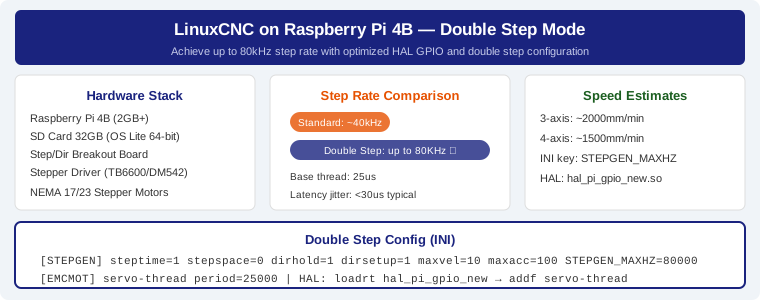
Double step mode is a LinuxCNC configuration where the stepgen module generates two step pulses per output period instead of one. This effectively doubles the step rate achievable with the same base thread timing. For example, with a 25us base thread period, standard mode yields about 40kHz max step rate. Double step mode pushes this to 80kHz — enough for most DIY CNC applications.
Download HAL GPIO Component
This custom hal_pi_gpio_new.so component provides direct GPIO access for step and direction signals on the Raspberry Pi 4B, optimized for double step mode timing.
Raspberry Pi 4B HAL GPIO Component
Custom HAL component for step/direction GPIO on Pi 4B. Optimized for double step mode with reduced jitter.
Installation Steps
1. Prepare the SD Card
Use Raspberry Pi OS Lite (64-bit) as the base. Download the image and write it to an SD card using Raspberry Pi Imager or balenaEtcher. The Lite version is preferred because it minimizes background processes that could interfere with real-time performance.
2. Install LinuxCNC
LinuxCNC is not available in the default Raspberry Pi OS repositories for 64-bit. Use the prebuilt image from the LinuxCNC forum or compile from source. The prebuilt route saves hours.
3. Install HAL GPIO Component
Download hal_pi_gpio_new.so using the button above and place it in your LinuxCNC HAL directory (/usr/lib/linuxcnc/modules/ or /usr/local/lib/linuxcnc/modules/ depending on your build). Then load it in your HAL file:
loadrt hal_pi_gpio_new
addf hal_pi_gpio_new servo-thread
net step-x <= stepgen.0.step => hal_pi_gpio_new.pin-00
net dir-x  <= stepgen.0.dir  => hal_pi_gpio_new.pin-01
4. Configure Double Step
Edit your machine INI file. Under the STEPGEN configuration section:
[STEPGEN]
steptime = 1
stepspace = 0
dirhold = 1
dirsetup = 1
maxvel = 10
maxacc = 100
STEPGEN_MAXHZ = 80000  # Double step, base thread at 25us
5. Optimize Thread Timing
Set the servo thread period in the [EMCMOT] section to 25000 (nanoseconds). This is the practical minimum for stable operation on Pi 4B. Test stability by running LinuxCNC’s latency test before cutting material.
Performance Expectations
With proper double step configuration on Pi 4B:
- 3-axis simultaneous: 80kHz step rate, ~2000mm/min on typical leadscrew machines
- 4-axis: 60kHz step rate, ~1500mm/min
- Latency jitter: typically under 30 microseconds (acceptable for most DIY work)
Frequently Asked Questions
Is Pi 4B better than Pi 5 for LinuxCNC?
Pi 5 offers roughly 2x the CPU performance and better GPIO timing. However, LinuxCNC ARM64 support on Pi 5 is still maturing as of 2026. Pi 4B remains the most tested and stable option for production use. For newer builds, consider testing with Pi 5 and the latest LinuxCNC 2.10 pre-release.
Can I use a Pi 4B with a Mesa FPGA card?
Yes, but only with Ethernet-connected Mesa cards like the 7i96 or 7i76E. The Pi 4B has no accessible PCIe bus (unlike Pi 5), so parallel-port-connected Mesa cards are not an option.
What is the maximum step rate without double step?
On Pi 4B with standard configuration and 25us base period, approximately 35-40kHz. Double step raises this to 70-80kHz.
What stepper drivers work best with this setup?
TB6600 and DM542 drivers are the most widely tested with Pi 4B GPIO output. Check Amazon.in for current pricing on TB6600 stepper drivers and Raspberry Pi 4B boards.
Related Reading
- SolidWorks CAM Post for LinuxCNC Lathe
- DIY Quick Change Tapping Attachment
- DRV8825 vs TMC2209: Stepper Driver Comparison
- CNC Control Software Comparison 2026
External Resources
- LinuxCNC: Stepper Diagnostics Guide
- Raspberry Pi 4B Official Specifications
- LinuxCNC Getting Started Guide
- LinuxCNC Latency Test Wiki
Disclosure: This post contains affiliate links. As an Amazon Associate, justLast.in earns from qualifying purchases. Some links in this article are affiliate links to Amazon.in and other retailers.