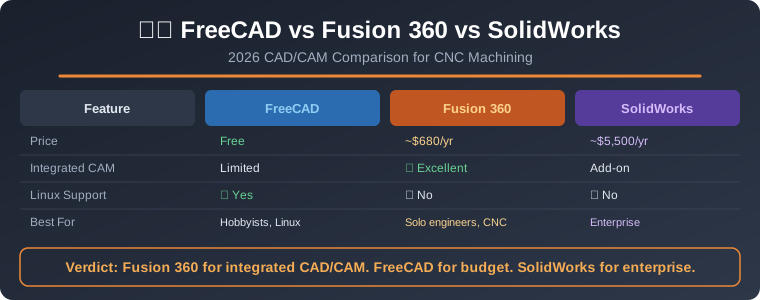
Key Takeaway: FreeCAD is the best free option for hobbyist CNC programmers, Fusion 360 dominates mid-range CAM with its integrated CAM workspace and cloud workflow, and SolidWorks remains the professional gold standard for complex multi-axis CNC machining — the right choice depends on your budget, complexity requirements, and production scale.
Choosing the right cad software cnc programming platform is one of the most consequential decisions a machinist, maker, or manufacturing engineer will make. The software you select directly impacts your toolpath quality, machine utilization, learning curve, and long-term operational cost. In 2026, three platforms dominate the conversation: FreeCAD, Fusion 360, and SolidWorks. Each targets a different user segment and excels in distinct areas of CNC workflow.
This guide compares all three head-to-head across CAM features, pricing, ease of use, machine compatibility, post-processor availability, and real-world CNC programming scenarios. Whether you are running a hobby GRBL machine or a 5-axis industrial center, this comparison will help you pick the right tool.
Table of Contents
Software Overview and 2026 Status
Before diving into features, it helps to understand where each platform stands in 2026 and who it is designed for.
FreeCAD
FreeCAD is an open-source parametric 3D modeler built on the Open CASCADE Technology kernel. The 1.0 release in late 2024 marked a major milestone, and the 2025–2026 development cycle has focused heavily on the integrated CAM workbench (formerly Path workbench). FreeCAD is entirely free, runs on Windows, macOS, and Linux, and is backed by an active community of developers and contributors. Its CNC capabilities have matured significantly, with support for 2.5D milling, 3-axis operations, and emerging 4-axis support.
Fusion 360
Autodesk Fusion 360 remains the most popular mid-range CAD/CAM platform for CNC programmers. Its integrated CAM workspace provides 2.5D, 3-axis, 4-axis, and 5-axis milling, turning, and even additive manufacturing in a single unified interface. Fusion 360’s cloud-based workflow, generous free tier for hobbyists and startups, and extensive post-processor library make it the default choice for a wide range of users. The 2026 updates have refined the adaptive clearing algorithms and added improved simulation visualization.
SolidWorks
Dassault Systèmes SolidWorks is the professional-grade choice for manufacturing engineers and machine shops working on complex parts. While SolidWorks itself is a CAD platform, its CAM capabilities come through integrated add-ins like SolidWorks CAM (powered by CAMWorks technology) or third-party modules. SolidWorks excels at complex multi-body modeling, assembly management, and drawing documentation — all critical for professional CNC programming environments.
CAM Feature Comparison
The CAM workspace is where cad software cnc programming truly happens. Here is how each platform handles the core machining operations.
FreeCAD CAM Capabilities
FreeCAD’s Path workbench (now simply called the CAM workbench in version 1.0+) supports the following operations out of the box:
- 2.5D Milling: Profile, pocket, drilling, adaptive clearing (via the OCL library), and face milling operations.
- 3-Axis Surfacing: Waterline, zig-zag, and offset strategies for complex surface finishing.
- 4-Axis: Basic rotary axis support is available but still maturing compared to commercial alternatives.
- Simulation: Built-in G-code visualization and material removal simulation. The accuracy has improved considerably since the 1.0 release.
- Post-Processors: FreeCAD includes a library of generic post-processors (GRBL, LinuxCNC, Fanuc, Mach3) and allows custom post creation using Python scripts.
The primary limitation remains the CAM workbench’s occasional instability with complex multi-operation setups and the smaller post-processor library compared to commercial options.
Fusion 360 CAM Capabilities
Fusion 360’s CAM workspace is widely considered the most capable integrated CAM system in its price range:
- 2.5D Milling: Adaptive clearing, pocketing, drilling, facing, and contour operations with intelligent tool selection and step-down optimization.
- 3-Axis: Advanced surface finishing with raster, spiral, scallop, and pencil trace strategies. Flowline machining for complex organic surfaces.
- 4/5-Axis: Simultaneous multi-axis toolpath strategies including flow, swarf, and tool-axis control with tilt options.
- Turning: Full CNC turning support including roughing, grooving, threading, and parting operations.
- Simulation: Highly accurate stock simulation with material removal visualization, collision detection, and machine simulation (with machine tool add-ins).
- Post-Processors: An extensive library of 1,000+ post-processors covering virtually every CNC controller on the market. Community post-processor repository is also available.
Fusion 360’s CAM is its strongest selling point for CNC programmers. The adaptive clearing algorithm alone can reduce cycle times by 30–50% compared to traditional trochoidal milling in less sophisticated software.
SolidWorks CAM Capabilities
SolidWorks CAM (powered by CAMWorks) brings industrial-grade machining capabilities to the SolidWorks environment:
- Knowledge-Based Machining (KBM): Automatic feature recognition and toolpath generation based on manufacturing rules you define. This is a major productivity advantage for shops producing similar parts repeatedly.
- 2.5D Milling: Automatic feature recognition identifies pockets, slots, holes, and contours from the SolidWorks model and generates optimized toolpaths.
- 3-Axis: Advanced surface finishing with multiple strategy options including Z-level, offset, and planar finishing.
- Mill-Turn: Full mill-turn support for multi-tasking machines, including live tooling and sub-spindle operations.
- Simulation: Material removal simulation with machine simulation support for complex multi-axis configurations.
- Post-Processors: CAMWorks provides an extensive post-processor library with customization through the NC Editor. Many machine OEMs provide SolidWorks CAM post-processors directly.
The Knowledge-Based Machining system is SolidWorks CAM’s killer feature. Once configured for your shop’s machines and tooling standards, it can generate complete machining programs from a 3D model with minimal manual intervention.
Pricing and Licensing Breakdown
Cost is often the deciding factor for small shops and individual machinists. Here is the 2026 pricing landscape.
FreeCAD Pricing
Free — $0 forever. FreeCAD is released under the LGPL license, meaning it is completely free for personal and commercial use. There are no subscription fees, no feature gates, and no usage limits. This makes it the obvious starting point for anyone exploring cad software cnc programming without financial commitment.
Fusion 360 Pricing
- Free Tier: Available for personal use, hobbyists, and startups earning less than $100,000/year. Includes full CAD and CAM functionality with some limitations (reduced cloud storage, fewer API calls, no access to certain advanced simulation features).
- Subscription: Approximately $545/year (as of mid-2026) for commercial use. Includes full access to all features, 100 GB cloud storage, and priority support.
- Startup Program: Free commercial license for qualifying startups, which is excellent for new manufacturing businesses.
SolidWorks Pricing
- SolidWorks Standard: Approximately $3,995/year (subscription) or $4,195 for perpetual license + $1,295/year maintenance. Includes basic 3D modeling and drawing tools.
- SolidWorks CAM (Add-in): Additional cost of approximately $3,000–$5,000/year depending on the CAM package (Standard, Professional, or Premium).
- Total Annual Cost: Expect $7,000–$10,000/year for SolidWorks with CAM capabilities. Perpetual licensing is available but the total cost of ownership is significantly higher.
For most small to mid-size shops, Fusion 360’s pricing model offers the best balance of capability and cost. FreeCAD is unbeatable on price, and SolidWorks justifies its premium only when the KBM system and enterprise features deliver measurable productivity gains.
Ease of Learning and Workflow
FreeCAD Learning Curve
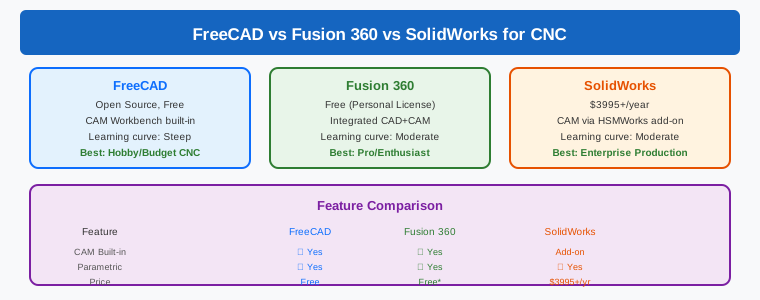
FreeCAD has the steepest learning curve of the three. The interface, while greatly improved in version 1.0+, still requires familiarity with parametric modeling concepts. The CAM workbench is functional but less polished than commercial alternatives. Users transitioning from Fusion 360 or SolidWorks often find FreeCAD’s workflow less intuitive, particularly for toolpath setup and simulation. However, the active community provides extensive tutorials, and the free price point makes it easy to experiment without risk.
Fusion 360 Learning Curve
Fusion 360 strikes the best balance between power and accessibility. The unified interface means you switch between modeling, CAM, simulation, and documentation without leaving the application. The learning resources are excellent — Autodesk provides structured learning paths, and the YouTube ecosystem has thousands of tutorials. Most users can produce basic 2.5D toolpaths within a few hours and proficient 3-axis programs within a few weeks.
SolidWorks Learning Curve
SolidWorks has the most mature and refined user interface, but it requires the most investment to learn fully. The parametric modeling workflow is powerful but demands disciplined design intent planning. The CAM add-in integrates well but adds another layer of complexity. SolidWorks excels when you need detailed drawing documentation and tolerance analysis alongside your CNC programming — features that Fusion 360 and FreeCAD handle less comprehensively.
Post-Processor and Machine Compatibility
A CAM system is only as good as its post-processor. The post-processor converts toolpath data into machine-specific G-code that your CNC controller can execute.
Fusion 360 leads in post-processor availability with over 1,000 certified post-processors covering Fanuc, Siemens, Haas, Mazak, Okuma, and virtually every major controller. The community post-processor repository adds hundreds more. Creating custom post-processors is possible using the built-in post-processor editor, though it requires some programming knowledge.
SolidWorks CAM/CAMWorks offers an extensive post-processor library with deep support for industrial controllers. CAMWorks provides an NC Editor for post-processor customization, and many machine tool OEMs include CAMWorks post-processors with their machines. For shops running specialized or legacy controllers, CAMWorks has the strongest post-processor support.
FreeCAD includes a reasonable selection of generic post-processors and allows custom post creation using Python scripts. While the library is smaller, the Python-based approach gives advanced users full control. For common controllers like GRBL, LinuxCNC, and standard Fanuc, FreeCAD provides adequate coverage out of the box.
Best Software by CNC Scenario
Hobby CNC (GRBL, LinuxCNC, Mach3/4)
Winner: FreeCAD or Fusion 360 (free tier). For someone running a Shapeoko, X-Carve, or similar hobby machine, both FreeCAD and Fusion 360’s free tier provide everything needed. FreeCAD is ideal if you prefer open-source tools and offline workflows. Fusion 360’s free tier offers a more polished CAM experience with better simulation.
Small Job Shop (1–3 machines)
Winner: Fusion 360. The subscription cost is minimal, the CAM capabilities cover 90% of typical job shop work, and the cloud workflow enables collaboration and remote access. Fusion 360’s adaptive clearing alone can justify the subscription through cycle time savings.
Medium Production Shop (5–20 machines)
Winner: SolidWorks CAM or Fusion 360. This is where the decision gets nuanced. If your shop produces high volumes of similar parts, SolidWorks CAM’s Knowledge-Based Machining system pays for itself through automated feature recognition and standardized toolpaths. If your work is more varied and prototyping-heavy, Fusion 360’s flexibility and lower cost make it the better choice.
Complex Multi-Axis Machining (4/5-axis)
Winner: SolidWorks CAM or dedicated CAM software. While Fusion 360 supports 5-axis operations, shops running simultaneous 5-axis work typically need the advanced tool-axis control, collision avoidance, and machine simulation that SolidWorks CAM (with CAMWorks Premium) or dedicated platforms like Mastercam provide. FreeCAD’s 4/5-axis support is not yet mature enough for production multi-axis work.
Side-by-Side Comparison Table
| Feature | FreeCAD | Fusion 360 | SolidWorks |
|---|---|---|---|
| Price | Free | Free–$545/yr | $7K–$10K/yr |
| 2.5D Milling | Yes | Yes (Advanced) | Yes (KBM) |
| 3-Axis | Yes | Yes (Advanced) | Yes (Advanced) |
| 4/5-Axis | Basic | Yes | Yes (Premium) |
| Turning | Limited | Yes | Yes |
| Post-Processors | ~50 (extensible) | 1,000+ | Extensive |
| Simulation | Basic | Advanced | Advanced |
| Platform | Win/Mac/Linux | Win/Mac (cloud) | Win only |
| Best For | Hobby / Budget | Job Shops / Startups | Production / Enterprise |
Final Verdict
There is no single “best” cad software cnc programming platform — the right choice depends entirely on your situation.
Choose FreeCAD if: You are a hobbyist or small maker on a tight budget, you value open-source tools, you run Linux, or you want to learn CNC programming fundamentals without financial commitment. FreeCAD has come a long way since version 1.0 and continues to improve rapidly.
Choose Fusion 360 if: You need a polished, all-in-one CAD/CAM solution with excellent CAM capabilities, you run a small to mid-size job shop, you want the best adaptive clearing and simulation in its price range, or you need cloud collaboration and remote access. Fusion 360 is the best all-around choice for most CNC programmers in 2026.
Choose SolidWorks if: You run a production shop with complex parts, you need Knowledge-Based Machining for repetitive work, you require advanced drawing documentation and tolerance analysis, or you are already invested in the Dassault Systèmes ecosystem. The higher cost is justified only when the productivity gains from KBM and enterprise features deliver measurable returns.
Regardless of which platform you select, remember that CAM software is a means to an end. The fundamental skills — understanding toolpath strategies, feeds and speeds, work-holding, and material behavior — matter more than the specific software. Master those fundamentals, and any of these three platforms will serve you well.
Frequently Asked Questions
Which is the best CAD software for CNC programming for beginners?
For beginners, Fusion 360 offers the best starting point with its free personal tier, intuitive interface, and extensive learning resources. FreeCAD is also viable for budget-conscious beginners but has a steeper learning curve. The free tier of Fusion 360 provides full CAM functionality, making it possible to learn CNC programming from basic 2.5D operations through advanced 3-axis work without spending anything.
Can FreeCAD generate G-code for industrial CNC machines?
Yes, FreeCAD can generate G-code for industrial machines, but with some limitations. It includes post-processors for common controllers like Fanuc, Siemens, and LinuxCNC. For standard 3-axis milling operations, FreeCAD produces usable G-code. However, for complex multi-axis machining or specialized controllers, you may need to write or modify the post-processor using FreeCAD’s Python scripting interface. For production environments with industrial controllers, Fusion 360 or SolidWorks CAM will save significant time in post-processor configuration.
Is Fusion 360 still free for CNC hobbyists in 2026?
Yes, Autodesk continues to offer a free personal use tier of Fusion 360 in 2026. This tier includes the full CAD modeling and CAM workspace with 2.5D, 3-axis, and limited 4/5-axis milling capabilities. Limitations include reduced cloud storage, fewer API calls, and restrictions on commercial use (businesses earning over $100,000/year need a paid subscription). For hobby CNC programmers running GRBL, Mach3, or LinuxCNC machines, the free tier is more than sufficient.
Does SolidWorks work with non-SolidWorks CAM for CNC programming?
Absolutely. SolidWorks models can be exported as STEP, IGES, or parasolid files and imported into virtually any CAM software, including Fusion 360, Mastercam, GibbsCAM, or SolidWorks CAM itself. Many shops use SolidWorks purely for CAD modeling and design documentation, then transfer models to a dedicated CAM system for toolpath generation. The SolidWorks file format is widely supported across the manufacturing software ecosystem.
Related Reading
- CNC Machine Calibration: Complete Guide to Squaring, Tramming, and Backlash Compensation — Essential calibration procedures to ensure your CAD-designed parts machine accurately.
- Fusion 360 CAM for CNC: Complete Toolpath Guide for 3-Axis Milling — A deep dive into Fusion 360’s CAM workspace for 3-axis CNC programming workflows.
Sources
- FreeCAD CAM Workbench Documentation — wiki.freecad.org
- Autodesk Fusion 360 Product Overview — autodesk.com
- SolidWorks CAM — Integrated CNC Programming — solidworks.com
- CAMWorks for SolidWorks — Knowledge-Based Machining — camworks.com
Disclosure: This article contains affiliate links. If you purchase software through these links, justLast.in may earn a commission at no additional cost to you. This does not influence our editorial recommendations. All comparisons are based on publicly available product information as of August 2026.