Key Takeaway: Smart home energy monitoring gives you real-time visibility into electricity usage across your entire home, individual circuits or specific appliances — and Matter 1.4 now supports energy devices natively across all major smart home platforms.
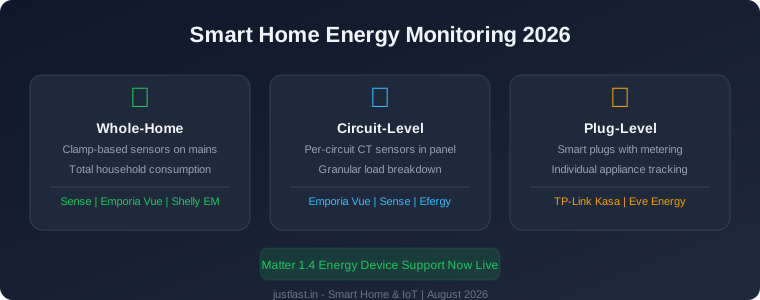
Table of Contents
1. Why Monitor Your Home Energy Usage?
The average household spends between $1,200 and $2,000 per year on electricity, yet most homeowners have no idea which appliances or behaviors are driving their bill. Without data, energy savings is guesswork. Smart home energy monitoring changes that by giving you real-time and historical data on exactly where your electricity goes.
Energy monitoring matters for three reasons:
- Identify phantom loads: Devices that draw power when “off” — set-top boxes, gaming consoles, chargers — can account for 5-10% of your total bill
- Catch failing appliances: A refrigerator compressor that suddenly draws 30% more power is a warning sign before it fails
- Optimize solar self-consumption: If you have rooftop solar, monitoring shows when to run high-draw appliances during peak generation
For homeowners with solar panels, our solar panel sizing guide covers system design, but energy monitoring is the tool that tells you whether your system is actually performing as expected.
2. Three Types of Energy Monitoring
Energy monitoring solutions fall into three categories, each suited to different needs and budgets.
Whole-Home Monitoring
Whole-home monitors install at your electrical panel and use current transformer (CT) clamps around the mains feed to measure total household consumption. They provide a single number — total watts in real time — plus historical trend data.
Best for: Getting started, identifying overall usage trends, comparing month-to-month consumption.
Limitations: Cannot tell you which specific appliance is drawing power. You see total consumption but need to cross-reference with known appliance usage patterns.
Circuit-Level Monitoring
Circuit-level monitors install multiple CT clamps — one per circuit breaker — in your electrical panel. This gives you a granular breakdown of consumption by circuit: HVAC, kitchen, laundry, lighting, EV charging, etc.
Best for: Detailed analysis, identifying which circuits drive your bill, troubleshooting phantom loads on specific circuits.
Limitations: Requires access to your electrical panel and may need an electrician for installation if your panel is crowded.
Plug-Level Monitoring
Smart plugs with built-in energy metering measure consumption of individual appliances. You plug the device between the wall outlet and the appliance, and the smart plug reports real-time and cumulative wattage, voltage and current.
Best for: Targeted analysis of high-draw appliances, comparing similar devices, troubleshooting specific circuits.
Limitations: One plug per appliance — not practical for monitoring an entire home.
3. Matter 1.4 and Energy Devices
In late 2025, the Connectivity Standards Alliance (CSA) added energy management devices to the Matter specification. This was a significant step because it means energy monitors, smart plugs with metering, and solar inverters can now integrate natively with Apple Home, Google Home, Amazon Alexa and Samsung SmartThings.
With Matter energy support:
- Energy data from your monitor appears directly in your smart home app’s energy dashboard
- You can create automations based on real-time consumption (e.g., turn off non-essential loads when consumption exceeds a threshold)
- Energy devices from different manufacturers work together — your Emporia monitor can trigger your smart thermostat to reduce HVAC load during peak demand
- No proprietary app is required for basic monitoring and control
The Matter Service API (TR-517), announced by the Broadband Forum in August 2026, takes this further by giving service providers and developers a standardized way to manage all Matter energy devices on a network. This is particularly relevant for utility companies looking to implement demand-response programs.
4. Best Energy Monitors Compared
| Monitor | Type | Circuits | Matter | Price |
|---|---|---|---|---|
| Emporia Vue Gen 3 | Circuit-level | 16 circuits | Yes | $169 |
| Sense Energy Monitor | Whole-home + AI | 2 mains | No | $299 |
| Shelly EM | Whole-home | 2 mains | No | $70 |
| Efergy Engage | Whole-home | 1 main | No | $55 |
| TP-Link Kasa Smart Plug (EP25) | Plug-level | 1 device | No | $15 |
Emporia Vue Gen 3 — Best Overall
The Emporia Vue Gen 3 is the strongest option for most homeowners. It monitors 16 individual circuits with CT clamps that install inside your electrical panel. The companion app provides real-time and historical data by circuit, and with Matter support, the data integrates directly into Apple Home and Google Home energy dashboards.
Sense — Best for Appliance Detection
Sense uses machine learning to identify individual appliances from the electrical signature on your mains. Over time, it learns to recognize your refrigerator, HVAC, washing machine and other devices. This is impressive technology but requires patience — it can take weeks to learn most devices, and some may never be identified.
5. Installation and Setup Guide
Whole-Home and Circuit-Level Installation
- Turn off the main breaker before opening your electrical panel
- Install CT clamps around the mains feed (whole-home) or individual circuit wires (circuit-level)
- Route the sensor wires to the monitor unit, which mounts inside or near the panel
- Power the monitor — most units draw power from the panel’s bus bars or have a dedicated power supply
- Connect to Wi-Fi and pair with the companion app
If your electrical panel is in a tight space or you are uncomfortable working around mains voltage, hire an electrician. Most installations cost $100-200 in labor.
Plug-Level Installation
Simply plug the smart plug into the wall outlet, plug your appliance into the smart plug, and pair with the companion app. No tools or electrical knowledge required.
Adding to Matter
For Matter-compatible monitors (like the Emporia Vue Gen 3), open your smart home app and scan the device’s QR code during initial setup. The monitor will appear in your energy dashboard automatically.
6. How to Use Data to Cut Your Bill
Energy monitoring data is only useful if you act on it. Here are proven strategies:
Week 1: Baseline
Just let the monitor collect data. Do not change any habits yet. You need a baseline to compare against.
Week 2: Identify Phantom Loads
Look at overnight consumption when you expect everything to be off. If the baseline shows 100-200W at 3 AM, something is drawing power unnecessarily. Common culprits: cable boxes, gaming consoles in standby, old chargers, always-on computers.
Week 3: Target Big Consumers
Check which circuits or appliances consume the most. HVAC typically accounts for 40-50% of total usage. Water heating is 15-20%. These are where thermostat adjustments, insulation improvements and scheduling produce the biggest savings.
Week 4: Optimize
Based on your data, make targeted changes: adjust thermostat schedules, replace inefficient appliances, add smart plugs to kill phantom loads, shift laundry and dishwashing to off-peak hours if you have time-of-use pricing.
Typical savings from energy monitoring range from 5-15% of total electricity costs, with some households reporting 20% or more after addressing phantom loads and optimizing HVAC.
7. Solar Integration and Net Metering
If you have rooftop solar panels, energy monitoring becomes even more valuable. With a circuit-level monitor, you can:
- See exactly how much solar energy you are producing vs consuming in real time
- Identify which appliances are running on solar vs grid power
- Optimize self-consumption by running high-draw appliances during peak solar production
- Monitor your solar system’s performance over time and catch inverter or panel degradation early
Matter energy devices make this data available in the same smart home dashboard where you control your lights, thermostat and other devices. For a complete solar setup guide, see our solar panel sizing guide.
8. Frequently Asked Questions
Is it safe to install energy monitors myself?
Plug-level monitors are completely safe to install — no tools required. Whole-home and circuit-level monitors require working inside your electrical panel. If you are comfortable flipping breakers and routing low-voltage sensor wires, it is manageable. If not, hire an electrician — most installations cost $100-200 in labor.
Do energy monitors work with solar panels?
Yes. Most circuit-level monitors can measure both grid consumption and solar production by placing CT clamps on both the solar inverter feed and the mains. Some monitors like the Emporia Vue Gen 3 include solar monitoring as a standard feature.
What is the cheapest way to start monitoring energy?
A single smart plug with energy metering (like the TP-Link Kasa EP25 at around $15) lets you monitor one appliance. For whole-home monitoring, the Shelly EM at around $70 is the most affordable option that gives you real-time total consumption data.
How accurate are smart plug energy monitors?
Most smart plugs report power consumption within 2-5% accuracy, which is sufficient for identifying usage patterns and comparing devices. For billing-grade accuracy, you need a UL-listed whole-home monitor like the Emporia Vue or Sense.
Related Reading
- How Many Solar Panels Do You Need to Power Your Home in 2026?
- Smart Bulbs vs Smart Switches: Which Is Better for Your Home in 2026?
- Best Smart Home Hubs 2026: Home Assistant vs SmartThings vs Hubitat vs Apple
- Matter 1.4 Smart Home Guide: Energy Devices, Thread Routers and Multi-Admin in 2026
Sources
- Broadband Forum — Matter Service API (TR-517)
- Connectivity Standards Alliance — Matter Protocol
- Emporia Energy — Vue Gen 3 Product Page
Disclosure: This post contains affiliate links. If you purchase through these links, we may earn a commission at no additional cost to you. Our recommendations are based on independent research and testing.