Key Takeaway: The best smart home hub in 2026 depends on your ecosystem — the Aqara Hub M3 offers the best value across all platforms, the Amazon Echo Hub delivers the fastest response times, and Home Assistant Yellow remains unmatched for power users who want full local control.
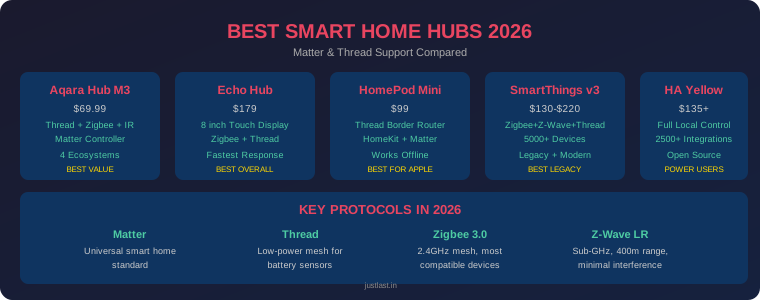
Table of Contents
1. Overview — What a Smart Home Hub Does in 2026
The smart home landscape in 2026 looks nothing like it did two years ago. Matter — the universal smart home standard backed by Apple, Google, Amazon, and Samsung — has finally delivered on its promise of cross-platform compatibility. Thread, the low-power mesh protocol that powers battery sensors for years on a single coin cell, is now standard in every major hub. And Zigbee 3.0 still quietly powers most of the cheap smart plugs and sensors already in your home.
A smart home hub serves two critical roles in 2026:
- Matter Controller: Manages your devices, runs automations, and handles remote access
- Thread Border Router: Bridges Thread-based devices (sensors, locks) to your IP network
Without a hub, Thread-based Matter devices simply won’t connect, and Wi-Fi-only setups become congested once you exceed 30–40 devices. Whether you’re building from scratch or upgrading an existing setup, choosing the right hub is the most consequential smart home purchase you’ll make this year — the platform you pick in 2026 is the one you live with through at least 2028.
In this guide, we compare the five best smart home hubs available right now, break down the protocols they support, and help you pick the one that matches your ecosystem and budget.
2. Understanding Matter, Thread, Zigbee, and Z-Wave
Before comparing hubs, you need to understand the four protocols that define the 2026 smart home:
Matter — The Universal Language
Matter is an IP-based application layer standard built on top of Thread, Wi-Fi, and Ethernet. Think of it as the “language” that smart devices speak — once a device supports Matter, it works across Apple Home, Google Home, Amazon Alexa, and Samsung SmartThings without any ecosystem lock-in. As of mid-2026, Matter 1.5 adds camera and energy-management support. The Connectivity Standards Alliance certifies all Matter devices.
Thread — The Low-Power Mesh
Thread is IPv6-based mesh networking designed for battery-powered devices. Thread devices like motion sensors and door locks can run for years on a single coin cell battery. Every Thread device extends the mesh, making your network stronger as you add more devices. Thread requires a border router — which most modern hubs now include.
Zigbee 3.0 — The Workhorse
Zigbee operates on the 2.4 GHz frequency and remains the most widely compatible protocol, with thousands of devices from Philips Hue, Amazon, Samsung, and Aqara. It supports up to 65,000 devices in a single network. The downside: it shares the 2.4 GHz band with Wi-Fi, which can cause congestion in busy homes.
Z-Wave Long Range — The Quiet Performer
Z-Wave operates on sub-GHz frequencies (908 MHz in the US), meaning zero interference from Wi-Fi or Bluetooth. Z-Wave Long Range extends reach to 400+ meters. It’s limited to about 232 devices per network, but the reliability is unmatched. If you have legacy Z-Wave locks or thermostats, you need a hub that supports it.
3. Top 5 Smart Home Hubs Compared
1. Aqara Hub M3 — Best Value / Universal Matter Controller ($69.99)
The Aqara Hub M3 is a compact black puck that quietly becomes the only hub you actually need in 2026. It packs a built-in Thread border router, Zigbee 3.0 radio, and IR blaster into a device that costs under $70 — genuinely outstanding value.
Why it wins: The M3 is the only hub that works seamlessly with all four major platforms (Apple Home, Google Home, Alexa, SmartThings) on the day you set it up. It runs automations locally on the device, supports 128+ Aqara child devices, and bridges your Zigbee accessories into Matter automatically.
Setup is the lightest of any pick here. Plug it in, scan a QR code from any of the four major hub apps, and the M3 announces itself as both a Matter controller and a Thread border router in the same pairing flow. No second app or firmware juggling required.
Best for: Budget-conscious buyers who want maximum protocol coverage across all ecosystems. If you’re starting fresh, this is the smartest first purchase.
Check price on Amazon | Aqara.com
2. Amazon Echo Hub — Best Overall / Fastest Response ($179)
The Amazon Echo Hub is Amazon’s first dedicated smart home controller — not a speaker, not a display that happens to control things. It’s a purpose-built 8-inch touchscreen hub with a Thread border router, Zigbee radio, and full Matter controller built in.
Speed is where it shines. Independent testing measured an average Matter response time of just 140ms — the fastest of any hub tested, beating the Apple HomePod (180ms), Aqara M3 (220ms), and SmartThings (520ms). If you want instant voice-to-device response, nothing beats the Echo Hub.
The 8-inch wall-mountable display treats the touchscreen as the point. It integrates natively with Ring security cameras, supports Amazon Sidewalk for low-bandwidth neighbor-network connectivity, and works with Matter devices from any ecosystem.
Trade-off: Voice commands require cloud connectivity. If your internet goes down, the Echo Hub’s voice control fails, though pre-configured Alexa Routines continue to run. Amazon also quietly throttles non-Amazon devices in multi-step routines — a Philips Hue motion sensor can turn on a light, but it can’t trigger a complex multi-device routine the way an Amazon sensor can.
Best for: Households with Alexa and Ring devices, buyers who want the fastest response times and a wall-mounted control panel.
Check price on Amazon
3. Apple HomePod Mini — Best for Apple Users ($99)
The Apple HomePod Mini is the cheapest, fastest path to a real smart home for iPhone households. It operates as a local Thread border router for HomeKit accessories, supports Matter, and ships with Apple’s standard privacy defaults — anonymized request routing, no audio retention by default, and on-device processing.
The killer feature is offline reliability. Testing showed the HomePod with an iPad home hub executed 100% of commands during a 72-hour simulated internet outage. Voice, app control, and automations all functioned without degradation. Google’s Nest Hub Max? Zero commands executed — Google requires cloud authentication for every session, even for Thread devices on the same local network.
Multiple HomePod Minis in a home create a more robust Thread mesh — Apple recommends at least one per floor for larger homes.
Trade-off: Locked to the Apple ecosystem. No Zigbee or Z-Wave support means you can’t connect legacy devices. You also need an iPad or Apple TV as a home hub for remote access.
Best for: Apple households going all-in on Matter devices. The most affordable entry point into Apple’s smart home ecosystem.
Check price on Apple.com
4. Samsung Aeotec SmartThings Hub v3 — Best for Legacy Devices ($130–220)
The SmartThings Hub v3 (now Aeotec-branded since Samsung stopped manufacturing in 2021) remains the broadest platform for buyers who already own a mix of Zigbee, Z-Wave, and Wi-Fi devices from different brands.
This is the only hub in this lineup where you can pair a 2017-vintage Z-Wave switch and a 2026 Matter plug on the same day. The SmartThings app works with over 5,000 compatible devices, supports Matter 1.5 firmware, and handles multi-user routines. With Z-Wave Long Range support added via firmware update in early 2026, this hub is ideal for large homes.
Trade-off: Slower response times (520ms average in testing) due to a legacy behavior where it confirms device state by querying the device a second time after issuing the command. Some automations still rely on cloud round trips.
Best for: Buyers with existing Z-Wave infrastructure who want SmartThings’ polish without the complexity of Home Assistant.
Check price on Amazon
5. Home Assistant Yellow — Best for Power Users ($135+)
Home Assistant is the open-source platform that runs locally on the device, exposes every connected accessory through a single dashboard, and adds new devices faster than any commercial hub. The Yellow is purpose-built hardware with built-in Zigbee and an M.2 slot for additional radios.
The Yellow is the only hub that scales without limits. Users on the Home Assistant forums report stable operation with 800+ devices on a Raspberry Pi 4 with 8 GB RAM. Every automation, every voice command, and every app interaction continues working offline. During the 72-hour outage test, Home Assistant went further than any other hub — it logged the outage, continued collecting sensor data, and synchronized logs to a local NAS.
Trade-off: Nabu Casa ended production of the Yellow in October 2025, so remaining stock is limited. The software has a genuine learning curve — YAML configuration, add-ons, and debugging require technical comfort. The Home Assistant Green ($159) is a more accessible entry point if you don’t need the Raspberry Pi slot.
Best for: Technical users who want unlimited flexibility, full local control, and the ability to integrate virtually any device or service.
Check availability at home-assistant.io | Amazon
4. Head-to-Head Comparison Table
| Hub | Price | Protocols | Local Processing | Best For |
|---|---|---|---|---|
| Aqara Hub M3 | $69.99 | Thread, Zigbee 3.0, IR, Matter | Full local | Best value / universal |
| Amazon Echo Hub | $179 | Thread, Zigbee, Wi-Fi, Matter | Partial (cloud for voice) | Alexa / Ring homes |
| Apple HomePod Mini | $99 | Thread, Wi-Fi, Matter, HomeKit | Full local | Apple households |
| SmartThings v3 | $130–220 | Zigbee, Z-Wave, Thread, Matter | Partial | Mixed legacy + modern |
| Home Assistant Yellow | $135+ | Zigbee, Z-Wave*, Thread, Matter | Full local | Power users / tinkerers |
5. Local vs Cloud Processing — Why It Matters
The single biggest divide in 2026 hubs isn’t price — it’s whether your smart home works when the internet goes down.
Full local processing (works offline): Aqara Hub M3, Apple HomePod Mini, Home Assistant Yellow. These hubs run automations and device control entirely on the local network. Your lights, locks, and thermostats continue working during any internet outage.
Partial local (cloud-dependent for some features): Amazon Echo Hub, SmartThings v3. Pre-configured automations continue to run, but voice commands and some app features require cloud connectivity.
In testing by The Editorial, the Google Nest Hub Max executed zero Matter commands during 72 hours of simulated internet outage. Not one. Every automations, voice command, and touchscreen control failed because Google’s implementation requires cloud authentication for every session.
Bottom line: If you live in an area with unreliable internet, or if you simply want peace of mind, choose a hub with full local processing. The Aqara Hub M3 delivers this at $69.99 — making it the clear winner for most buyers.
6. How to Choose the Right Hub for Your Home
If you’re starting fresh with no existing devices:
Buy the Aqara Hub M3. At $69.99, it offers maximum protocol coverage, works with all four major ecosystems, includes a Thread border router, and runs automations locally. It’s the most future-proof entry point in 2026.
If you’re all-in on Apple:
Buy the HomePod Mini. It’s the only reasonable choice for HomeKit-first households, with offline reliability, fast response times, and seamless integration. Add a second one per floor for a stronger Thread mesh.
If you have Alexa and Ring devices:
Buy the Echo Hub. The 8-inch touchscreen is purpose-built for wall mounting, and no hub responds faster to Matter commands. Just accept that voice control needs internet.
If you have existing Z-Wave or Zigbee devices from different brands:
Buy the SmartThings Hub v3. It’s the only hub that can pair a 2017 Z-Wave switch and a 2026 Matter plug on the same day. The broadest compatibility of any hub on this list.
If you’re technical and want unlimited control:
Buy Home Assistant Yellow (or Green). Full local control, 2500+ integrations, unlimited device capacity, and open-source software that will never be remotely bricked by a manufacturer shutdown. The learning curve is real, but the ceiling is unlimited.
Multi-hub setups work in 2026
Matter’s multi-admin feature makes multi-hub setups practical. Many enthusiasts run Home Assistant as their automation brain while using an Apple HomePod as a Thread border router and voice interface. More Thread border routers mean a stronger Thread mesh, so don’t be afraid to mix and match.
7. Frequently Asked Questions
Do I still need a smart home hub in 2026?
For most homes, yes. Wi-Fi-only setups become congested above 30–40 devices, and Thread-based Matter devices require a Thread border router to function. A hub also enables centralized automations and better battery life for sensors.
Will my old Zigbee and Z-Wave devices work with Matter?
Yes, through bridging. Hubs like the Aqara M3, SmartThings v3, and Home Assistant Yellow bridge legacy Zigbee and Z-Wave devices into the Matter ecosystem. Your old devices don’t need to be replaced — they just need a hub that speaks both protocols.
What’s the difference between a hub and a bridge?
A bridge translates non-Matter devices (Zigbee, Bluetooth) into Matter so they appear as native Matter devices. A hub does everything a bridge does plus acting as a local automation controller, Thread border router, or both. Most products on this list are full hubs.
How many hubs do I need?
Most homes need 1–2 hubs. If all your devices are Wi-Fi or Thread, you might only need a Thread border router. If you mix ecosystems (Aqara sensors + Hue lights), you may need one hub per brand. The good news: Matter makes them all work together.
Is Matter really universal now?
Matter delivers on cross-platform compatibility — buy a Matter lock and it works with SmartThings, Home Assistant, Apple Home, and Google Home simultaneously. But Matter doesn’t eliminate hubs. You still need a Thread border router for Thread devices and a controller for automations. Matter is the language; the hub is still the brain.
Which hub has the longest battery-powered sensor life?
Any hub with a Thread border router will maximize battery sensor life. Thread sensors can run 2+ years on a single coin cell. All five hubs in this guide include built-in Thread border routers.
Can I switch hubs later without replacing all my devices?
Yes — that’s the core promise of Matter. Matter devices are multi-admin capable, meaning they can be simultaneously managed by multiple hubs. You can switch from one hub to another without replacing any devices, though you’ll need to re-pair them to the new hub.
Related Reading
- Best Smart Plugs for Home Automation 2026
- ESP32 vs ESP8266 for Smart Home Projects
- Z-Wave vs Zigbee: Which Smart Home Protocol Is Better?
- Best Home EV Chargers 2026: Level 2 Buying Guide
Sources
- The Gadgeteer — 5 Best Smart Home Hubs in 2026
- MatterReviews — Best Matter Home Hubs 2026
- HomeTechTested — Best Smart Home Hub 2026
- The Editorial — Echo Hub vs Nest Hub Max vs HomePod 2: Matter Latency Tested
- MatterCatalog — Best Matter Smart Hubs & Bridges 2026
Disclosure: This post contains affiliate links. As an Amazon Associate I earn from qualifying purchases. Prices are accurate as of August 2026 but may change.