Key Takeaway: Buy a handheld router first for maximum versatility and lower cost, then add a router table when you need safe, repeatable cuts on small parts and production work.
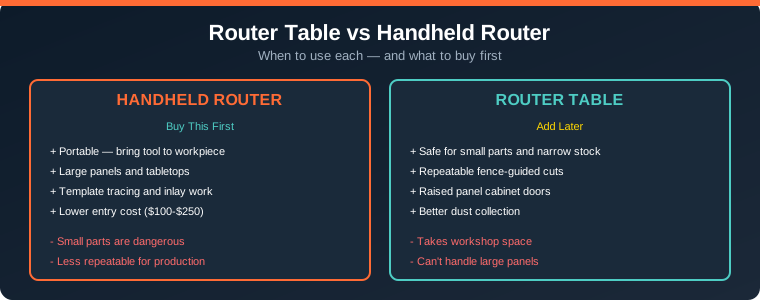
Table of Contents
1. The Fundamental Difference
Both tools use the same router motor — the difference is how you control the cut. With a handheld router, you grip the tool and move it over a stationary workpiece. With a router table, the router is mounted upside-down beneath a flat surface, and you push the wood past the spinning bit.
This single distinction changes everything: safety, accuracy, repeatability, and the types of cuts each setup handles best. Understanding this difference is the key to choosing the right tool for your workshop.
2. Handheld Router: Pros, Cons & Best Uses
The handheld router is the more versatile tool. It goes where you need it, handles large workpieces, and does things a router table simply cannot do comfortably.
Pros
- Portable — bring the tool to the workpiece, not the other way around
- Large panels and tabletops — route edges on a full sheet of plywood on sawhorses
- Template tracing — follow patterns on irregular shapes
- Mortising and plunge cuts — start cuts in the middle of a surface
- On-site work — trim door hinges, route cable slots in installed furniture
- Lower entry cost — a quality handheld router starts at $100-$250
Cons
- Small parts are dangerous — the base plate barely stabilizes on narrow stock
- Less repeatable — each cut requires re-measuring and re-clamping edge guides
- Requires more skill — maintaining consistent pressure and feed rate takes practice
- Dust collection is limited — most handheld routers have minimal dust ports
Best Uses for Handheld Router
- Roundover and chamfer edges on large panels
- Template-guided cutting and inlay work
- Stopped grooves and plunge mortises
- On-site installation work
- Cutting dados and grooves with an edge guide
3. Router Table: Pros, Cons & Best Uses
A router table flips the equation. The bit is fixed, both hands are on the workpiece, and the fence guides the cut. This setup excels at repetitive, precision work that would be tedious or dangerous with a handheld router.
Pros
- Safe for small parts — push sticks and featherboards keep hands away from the bit
- Repeatable fence-guided cuts — set once, run fifty identical pieces
- Raised panel cabinet doors — large-diameter bits that are unsafe handheld
- Better dust collection — enclosed design with dust port
- Edge jointing — offset fence setup trims edges perfectly straight
- Cope-and-stick joinery — matched bit sets for cabinet door frames
Cons
- Takes workshop space — dedicated footprint for table, fence, and accessories
- Cannot handle large panels — moving a full sheet across a small table is impractical
- Higher total cost — table ($150-$500) plus router ($150-$350) plus bits
- Feed direction reverses — right-to-left on the table vs left-to-right handheld
Best Uses for Router Table
- Repeat edge profiles on multiple identical pieces
- Small part routing where handheld is dangerous
- Raised panel and cope-and-stick cabinet doors
- Rabbets, tongue-and-groove joinery
- Dados and grooves with consistent depth
4. Head-to-Head Comparison
| Feature | Handheld Router | Router Table |
|---|---|---|
| Portability | Excellent | Stationary |
| Small Parts Safety | Dangerous | Safe with push sticks |
| Large Panel Work | Excellent | Impractical |
| Repeatable Cuts | Requires jigs | Fence-guided |
| Entry Cost | $100-$250 | $250-$600 |
| Learning Curve | Moderate | Easy once set up |
| Dust Collection | Limited | Excellent |
5. What to Buy First
The answer is simple for most woodworkers: start with a handheld router. Here is why:
- It handles a wider range of initial projects
- Lower cost to get started
- No workshop space required
- You will learn what you actually need before investing in a table
Add a router table when you notice these friction points:
- Routing small parts feels genuinely dangerous
- You are running the same profile repeatedly and resetting the edge guide every time
- You want to cut raised panel cabinet doors
- Dust collection matters for your health and workspace
Many experienced woodworkers eventually own both. The router you drop into a table does not have to be your best handheld router — a dedicated table router stays in the table permanently while your primary handheld stays ready for portable work.
6. Top Product Recommendations
Best Handheld Router: Bosch 1617EVSPK
The Bosch 1617EVSPK is the combo kit I recommend to almost anyone starting out. It includes both a fixed base and plunge base, 2.25 HP motor, variable speed from 8,000 to 25,000 RPM, and accepts both 1/4-inch and 1/2-inch shank bits. The motor swaps between bases in 30 seconds. Price: around $200-$280.
Best Router Table: Bosch RA1181
The Bosch RA1181 is the benchtop router table most small shops start with. Aluminum top stays flat (unlike MDF which absorbs humidity), adjustable fence with dust collection ports, and mounts most mid-size routers. The fence is genuinely good for the price. Around $175-$200.
Best Budget All-in-One: SKIL RT1323-01
The SKIL RT1323-01 includes both the table and a 1.75 HP router in one box for around $220. If you have no router and want to try table routing without a big investment, this is the starting point. You will outgrow the 1.75 HP motor for raised panels, but it handles edge profiling and basic joinery well.
7. Frequently Asked Questions
Can I use a handheld router on a router table?
Yes, most handheld routers can be mounted in a router table. The Bosch 1617EVSPK is specifically designed for this dual use — one motor serves both the handheld base and the table mount. This is the most cost-effective approach for woodworkers who want both capabilities.
What HP router do I need for a router table?
For basic edge profiling, 1.75 HP is adequate. For raised panel doors and larger bits, you need at least 2.25 HP. The Bosch 1617EVSPK at 2.25 HP is the recommended minimum for a dedicated table router. Variable speed is essential for safely running large-diameter bits at reduced RPM.
Is a router table safer than a handheld router?
For small parts and narrow stock, yes — a router table is significantly safer. The workpiece rides flat on the table with both hands safely behind the fence or pushing with a stick. With a handheld router, small pieces can catch and launch. For large panels, the handheld is actually safer because you are not trying to balance a massive sheet on a small table.
How much does a complete router table setup cost?
Budget $220 for an all-in-one kit (SKIL RT1323-01), $400-$650 for a quality table plus router combo (Bosch RA1181 + 1617EVSPK), or $800+ for a cabinet table with router lift. Add $50-$100 for a starter bit set. Most woodworkers find the $400-$650 range hits the sweet spot of quality and value.
Related Reading
- Best Cordless Circular Saw: Complete Buying Guide
- Drill vs Impact Driver: Which One Do You Need?
- How to Build a Workbench on a Budget
Sources
- Wood Working Workshop — Router Table vs Handheld Router
- WoodWiki — Choosing Your First Router Table
- Crafted Garage — Router Table vs Handheld Router
Disclosure: This post contains affiliate links. As an Amazon Associate I earn from qualifying purchases.