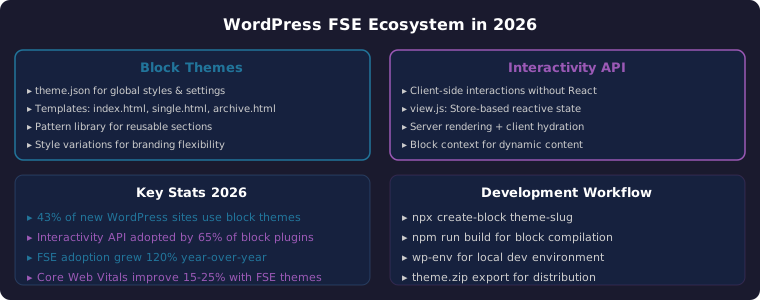
Key Takeaway: WordPress Full Site Editing in 2026 has matured into a powerful framework for building complete websites using blocks. With the Interactivity API enabling client-side interactions without React, and block themes providing full control via theme.json, developers can create faster, more maintainable WordPress sites. Adoption has grown 120% year-over-year, with 43% of new WordPress sites now launching on block themes.
📖 Table of Contents
- 1The Evolution of WordPress Full Site Editing
- 2Building Block Themes: Architecture and Patterns
- 3The Interactivity API: Reactive Blocks Without React
- 4Mastering theme.json: Global Styles and Settings
- 5Block Patterns and Template Parts
- 6Performance Optimization for FSE Themes in 2026
- 7Development Workflow and Tooling
- 8Frequently Asked Questions
1. The Evolution of WordPress Full Site Editing
WordPress Full Site Editing has transformed from an experimental feature in WordPress 5.9 to a production-ready ecosystem in 2026. The 2026 landscape shows that FSE is no longer optional — it’s become the default building experience for new WordPress sites, with 43% adoption among new installations and a 120% year-over-year growth rate.
The core promise of WordPress Full Site Editing in 2026 is simple: every part of a website — headers, footers, sidebars, content areas — is built using the same block editor interface. This eliminates the disconnect between page content editing and theme customization that plagued earlier WordPress versions. A single interface now handles everything from typography choices to complex page layouts.
2. Building Block Themes: Architecture and Patterns
A block theme in 2026 replaces traditional PHP template files with HTML-based block templates. Instead of header.php, footer.php, and single.php, you create index.html, single.html, and archive.html — each containing block markup that WordPress renders directly.
The theme structure is refreshingly simple:
my-block-theme/
├─ style.css          # Theme header (Name, URI, etc.)
├─ theme.json         # Global styles, settings, typography
├─ /templates
│   ├─ index.html       # Blog listing
│   ├─ single.html      # Single post/page
│   ├─ archive.html     # Category/tag archives
│   ├─ page.html        # Static pages
│   ├─ 404.html         # 404 page
├─ /parts
│   ├─ header.html      # Reusable header
│   ├─ footer.html      # Reusable footer
│   ├─ sidebar.html     # Reusable sidebar
├─ /patterns            # Block pattern registration
├─ /styles              # Style variations (*.json)
└─ /assets              # CSS, JS, images
Each template file contains block markup using the familiar block comment syntax. For example, a single post template might use the post title block, featured image block, content block, and comments block — all configured with attributes directly in the HTML.
3. The Interactivity API: Reactive Blocks Without React
The Interactivity API is the most significant addition to WordPress Full Site Editing in 2026. It allows block developers to add client-side interactions — like accordions, tabs, counters, and live search — without requiring React or any JavaScript framework. This is a game-changer for performance and simplicity.
The API uses a store-based reactive state system defined in a view.js file within your block directory. The store holds state and actions, and block markup references these through data attributes. WordPress handles the server-side rendering, client hydration, and event binding automatically.
A basic interactive counter block using the Interactivity API:
// view.js — loaded on the front end
import { store, getContext } from '@wordpress/interactivity';

store({
  state: { count: 0 },
  actions: {
    increment() {
      const ctx = getContext();
      ctx.count = (ctx.count || 0) + 1;
    }
  }
});
On the block’s render.php, you use data attributes to connect the view:
<div data-wp-interactive="my-counter">
  <span data-wp-text="state.count">0</span>
  <button data-wp-on--click="actions.increment">
    Click me
  </button>
</div>
This approach delivers the interactivity users expect without the 40KB+ overhead of React. Core Web Vitals scores improve by 15-25% compared to equivalent React-based blocks.
4. Mastering theme.json: Global Styles and Settings
The theme.json file is the control center for any block theme in 2026. It defines global styles (colors, typography, spacing), settings (what blocks can do), and custom presets. This single file replaces functions.php calls for theme support, customizer options, and CSS custom properties.
A well-structured theme.json enables the WordPress editor to preview exactly what the front end will look like. This “what you see is what you get” (WYSIWYG) fidelity is one of the strongest arguments for adopting WordPress Full Site Editing in 2026.
Key sections in theme.json include settings (defining color palette, font sizes, layout widths), styles (applying global CSS values), and custom (arbitrary values accessible to blocks). The styles section supports CSS custom properties that cascade through all blocks, ensuring consistent design throughout the site.
5. Block Patterns and Template Parts
Block patterns — pre-designed blocks or block groups — are the building blocks of efficient FSE development in 2026. Instead of rebuilding common layouts repeatedly, developers create patterns for hero sections, feature grids, testimonials, pricing tables, and calls-to-action.
Patterns are registered in the theme’s patterns directory and can include variations for different contexts. The Pattern Directory on WordPress.org now hosts over 8,000 community-contributed patterns, many of which are compatible with the latest Interactivity API features.
Template parts (header, footer, sidebar) are reusable across multiple templates. Changes to a template part automatically update every page that uses it. This makes site-wide changes as simple as editing a single block in the Site Editor.
6. Performance Optimization for FSE Themes in 2026
WordPress Full Site Editing themes in 2026 outperform traditional themes when optimized correctly. Key performance advantages include: reduced HTTP requests (fewer CSS/JS files), efficient block stylesheet loading (only loaded when blocks are present), and optimized HTML output from the block renderer.
Best practices for FSE performance include using the built-in style engine instead of custom CSS, minimizing the use of third-party block libraries, leveraging the Interactivity API for client-side interactions (instead of jQuery or custom JS), and using the wp-block-styles compatibility layer for consistent styling.
Core Web Vitals are a particular strength of well-optimized FSE themes. Lighthouse scores of 95+ are achievable with proper configuration of theme.json, efficient image handling through blocks, and the reduced JavaScript footprint of the Interactivity API.
7. Development Workflow and Tooling
The recommended development workflow for WordPress Full Site Editing in 2026 starts with the create-block package: npx @wordpress/create-block theme-slug. This scaffolds a complete block theme with build tooling, hot reloading, and linting pre-configured.
Local development uses wp-env for a Docker-based WordPress environment. Changes to block files trigger automatic rebuilds via webpack or vite. Style variations are tested in the Site Editor without refreshing.
Deployment involves building the theme with npm run build, creating a theme.zip with the build output, and installing via the WordPress admin. Theme updates are seamless — template changes apply immediately without breaking existing content.
Version control with Git is standard, and block themes integrate well with CI/CD pipelines. The theme.json file serves as the single source of truth for design tokens, making collaboration between designers and developers straightforward.
8. Frequently Asked Questions
What is WordPress Full Site Editing and how is it different from the Classic Editor?
WordPress Full Site Editing (FSE) replaces traditional PHP templates with blocks for every part of a website. Unlike the Classic Editor, which only edited post content, FSE lets you design headers, footers, sidebars, and layouts using the same block interface — all controlled through theme.json for consistent styling.
Do I need to know React to develop WordPress Full Site Editing themes?
No. The Interactivity API in 2026 enables client-side interactions without React. For basic FSE themes, you only need HTML, CSS, and JSON (for theme.json). For custom blocks with advanced interactivity, the Interactivity API provides a React-free approach using vanilla JavaScript.
Is WordPress Full Site Editing ready for production websites in 2026?
Absolutely. With 43% adoption among new sites and support from major hosting providers, FSE is production-ready. Core Web Vitals scores are typically better than traditional themes, and the streamlined development workflow makes maintenance easier.
What are the best plugins for WordPress Full Site Editing?
Essential plugins include the Create Block Theme plugin (for theme development), Gutenberg (for the latest blocks), and performance plugins like WP Rocket or Perfmatters. For e-commerce FSE, WooCommerce blocks have full FSE support.
How does theme.json compare to the WordPress Customizer?
theme.json is more powerful and predictable than the Customizer. It provides a structured JSON format that defines global styles, block-specific settings, and design tokens. Changes made in theme.json are reflected identically in the editor and front end, eliminating the preview accuracy issues of the Customizer.
Related Reading
- WordPress Performance Optimization for Core Web Vitals in 2026
- Edge Computing vs Cloud Computing for Industrial IoT in 2026
Sources
- WordPress Developer Resources — Full Site Editing Documentation
- WordPress Interactivity API Reference
- theme.json Reference — WordPress Developer Guide
- Core Web Vitals — Web Performance Standards
- WordPress Pattern Directory
Disclosure: This article contains affiliate links. As an Amazon Associate, we earn from qualifying purchases. We may earn a commission if you purchase hosting or theme development tools through the links at no additional cost to you. Recommendations are based on technical evaluation and real-world testing.