Key Takeaway: The Pinecil V2 at $26 is the best soldering iron for beginners in 2026, offering USB-C PD power, open-source firmware, and sub-10-second heat-up — but the Hakko FX-888D remains the superior benchtop station for marathon soldering sessions.
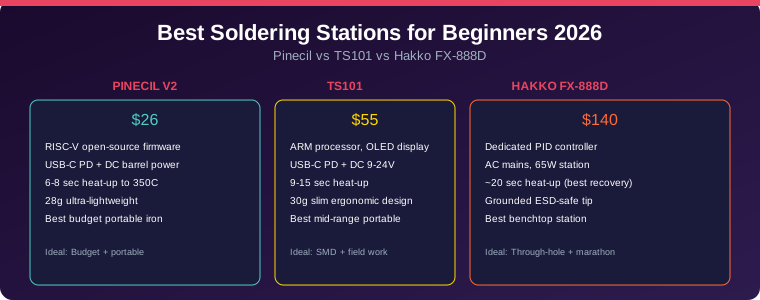
Table of Contents
1. Why Your First Soldering Iron Matters
Picking the right soldering iron is one of those decisions that either makes electronics projects enjoyable or turns them into a frustrating mess of cold joints and burned pads. The three irons covered here represent three distinct price tiers and use cases, and the best one for you depends on what you actually build, where you build it, and how much time you spend at the bench.
The good news: a cheap iron with proper technique produces better joints than an expensive iron in untrained hands. But starting with the right tool gives you the best chance of success.
2. Head-to-Head Comparison
| Feature | Pinecil V2 | TS101 | Hakko FX-888D |
|---|---|---|---|
| Price | $26 | $55 | $140 |
| Max Wattage | 65W (USB-C PD) | 45W USB-C / 65W DC | 65W (AC mains) |
| Heat-up Time | 6-8 sec | 9-15 sec | ~20 sec |
| Temp Range | 100-400C | 50-400C | 50-480C |
| Temp Stability | +/-2C | +/-2C | +/-1C |
| Power Input | USB-C + DC barrel | USB-C + DC barrel | AC mains |
| Weight | 28g | 30g | ~60g (handpiece) |
| Firmware | Open-source (IronOS) | Proprietary | Proprietary |
| ESD Ground | External needed | External needed | Built-in |
| Display | OLED | OLED | Digital LED |
3. Pinecil V2 — Best Budget Portable
The Pinecil V2 at around $26 is the best value soldering iron for beginners in 2026. Built around a RISC-V processor running open-source IronOS firmware, it delivers features that were impossible at this price point just a few years ago.
Why the Pinecil stands out:
- USB-C PD and QC 3.0 power — works with your phone charger or power bank
- Sub-10-second heat-up to 350C — fastest in this comparison
- 28 grams — ultra-lightweight, reduces hand fatigue
- Open-source firmware — community-driven updates and customization
- Auto-sleep via accelerometer — saves tip life and power
What you need to know: The Pinecil needs an external power source (USB-C PD charger or DC adapter, not included). For the best experience, pair it with a 65W USB-C PD charger. Total kit cost: around $50.
4. Miniware TS101 — Best Mid-Range
The Miniware TS101 splits the difference between the budget Pinecil and the professional Hakko. With an ARM processor, OLED display, and dual power input (USB-C PD + DC barrel), it handles everything from SMD rework to through-hole joints.
Why the TS101 is worth the extra cost:
- Slimmer, more ergonomic design — comfortable for extended sessions
- Compatible with TS100 tips — widest tip selection available
- Dual power input — USB-C PD or DC 9-24V
- OLED display — shows temperature, power, and settings
- Proven reliability — successor to the popular TS100
The TS101 is the sweet spot for hobbyists who solder regularly but do not need a full benchtop station. At around $55, it is twice the price of the Pinecil but delivers a more refined experience.
5. Hakko FX-888D — Best Benchtop Station
The Hakko FX-888D (now succeeded by the FX-888DX at $130-$150) is the gold standard for hobbyist benchtop soldering. Its ceramic heater delivers superior thermal recovery, the grounded ESD-safe tip protects sensitive components, and the station design keeps everything organized.
Why the Hakko is worth $140:
- Best thermal recovery — maintains temperature on heavy copper pours
- Grounded ESD-safe tip — built into the station, no external ground wire needed
- T18-series tips — wide selection, excellent quality, long-lasting
- Station design — integrated stand, brass wool holder, stable base
- Temperature stability +/-1C — best in class
The Hakko is the right choice if you solder for hours every day, work on production runs, or need the thermal mass to handle large connectors and ground planes without waiting for recovery.
6. Complete Budget Kits
| Budget | Iron | Solder | Tips | Accessories | Total |
|---|---|---|---|---|---|
| $50 Kit | Pinecil V2 ($26) | 63/37 0.6mm ($10) | TS-D24 chisel ($5) | Brass wool + flux ($9) | ~$50 |
| $100 Kit | TS101 ($55) | 63/37 0.6mm ($10) | TS-D24 + TS-B2 ($10) | Brass wool + flux + mat + ESD strap ($27) | ~$102 |
| $200 Kit | Hakko FX-888DX ($140) | 63/37 0.6mm ($10) | T18-D24 + T18-B ($15) | Brass wool + flux + mat + fume extractor ($47) | ~$212 |
The $50 kit gets you soldering immediately and handles everything up to moderate SMD work. The $100 kit adds comfort and safety gear. The $200 kit is the buy-once, cry-once setup that will last years of regular use.
7. Frequently Asked Questions
What temperature should I solder at?
Aim for 320-350C for leaded solder (63/37 or 60/40) and 360-390C for lead-free solder. Start at 350C and adjust based on how quickly the joint flows. Lower temperatures mean longer heating time, which can damage components. Higher temperatures risk lifting pads and burning flux.
Leaded vs lead-free solder — which should I use?
For hobbyists and learning, leaded solder (63/37 tin-lead) is easier to work with, has a lower melting point, and produces shinier joints. Lead-free solder is required for commercial products (RoHS compliance) but is harder to work with. Start with leaded for learning, switch to lead-free when selling products.
Do I need a fume extractor?
Yes, absolutely. Soldering produces flux fumes that are harmful to lungs with prolonged exposure. A simple fan-based fume extractor ($25-$40) positioned near your work area makes a significant difference. At minimum, work near an open window with a small fan pulling fumes away from your face.
Can I solder SMD components as a beginner?
Yes, with the right technique and tools. Start with 0805 or 0603 size components — they are large enough to solder by hand with a fine tip. The Pinecil V2 or TS101 with a TS-B2 conical tip (1.0mm) handles fine-pitch SMD work well. Practice on scrap boards first.
How often should I replace soldering tips?
A quality tip lasts 6-12 months with regular use if properly maintained. Clean the tip on brass wool (not a wet sponge), tin the tip before storage, and never scrape oxidation with a knife. Replace when the tip no longer tins properly or develops pits.
Related Reading
- Breadboard Projects for Beginners: Complete Guide
- Resistor Color Code Guide: How to Read Resistors
- Soldering Techniques: From Basics to Advanced
Sources
- Botmonster Tech — Soldering Irons Tested: Pinecil, Hakko FX-888D, TS101
- Tom’s Hardware — Best Soldering Irons and Stations 2026
- Raspberry Pi Magazine — Pinecil Soldering Iron Review
Disclosure: This post contains affiliate links. As an Amazon Associate I earn from qualifying purchases.