Key Takeaway: The July 2026 Autodesk Fusion update delivers five major features that directly address the most painful bottlenecks in product development. On-demand configurations eliminate the problem of managing hundreds of product variants. Find Similar Components slashes duplicate parts across teams. A new hub-based threads library enforces engineering standards. The 3+2 clearing strategy simplifies multi-axis CNC programming. And direct Altium Designer project import removes a major barrier for electronics-to-mechanical collaboration. For shops using Fusion, this is the most impactful single update of the year.
📖 Table of Contents
- 1The Connected Platform Advantage
- 21. On-Demand Configurations: Smarter Product Variant Management
- 32. Find Similar Components: Eliminating Duplicate Parts
- 43. Hub-Based Threads Library: Engineering Standards at Scale
- 54. 3+2 Clearing Strategy: Simplified Multi-Axis Programming
- 65. Altium Designer Project Import: Bridging ECAD and MCAD
- 7What This Means for Product Development Teams
- 8Frequently Asked Questions
- 9Related Reading
- 10Sources
The Connected Platform Advantage
Autodesk Fusion has evolved significantly from its origins as a cloud-based CAD tool. In 2026, it is a full-stack product development platform spanning industrial design, mechanical engineering, electronics design, manufacturing simulation, and CAM programming. The July 2026 update demonstrates this breadth more clearly than any previous release, with major improvements across design, manufacturing, electronics, and data management.
The common thread across all five features is reducing friction — between design intent and manufacturing execution, between mechanical and electronics teams, and between individual engineers and the shared standards that keep product development consistent.
1. On-Demand Configurations: Smarter Product Variant Management
Managing configurable products with hundreds or thousands of variants has always been a challenge in CAD. Traditional approaches generate every possible variant in advance, consuming enormous storage and making it difficult to find the right configuration when you need it.
Fusion’s new On-Demand Configurations capability takes a fundamentally different approach. Instead of pre-generating all variants, Fusion creates configurations only when they are needed during downstream workflows such as Insert, Switch Configuration, and Derive. If a matching configuration already exists, it is reused automatically. New configurations are generated only when no match is found, and results are synchronized back to the configuration table.
The update also introduces a Test Row capability that lets teams evaluate configuration combinations before committing them to production tables. This reduces the risk of introducing invalid or unexpected variants into the product structure.
2. Find Similar Components: Eliminating Duplicate Parts
Duplicate parts are a pervasive problem in product development, especially in larger organizations where multiple engineers may independently model similar components. The new Find Similar Components capability addresses this by searching a Fusion hub for parts or assemblies with similar geometry. Results are ranked by geometric similarity, complete with visual previews, helping engineers quickly identify existing components before modeling new ones.
Filters allow searches to be narrowed by project and control whether internal components are included. This feature is available through the Fusion Design Extension and is particularly valuable for organizations with large, shared component libraries.
3. Hub-Based Threads Library: Engineering Standards at Scale
Thread standards are one of those details that seem simple but cause disproportionate problems when they are inconsistent. Different team members may use different thread tables, different naming conventions, or different depth specifications, leading to costly mismatches between designed parts and manufactured hardware.
The new Hub-Based Threads Library introduces centralized management for custom thread definitions. Using the Manage Threads command, teams can create, manage, and share thread standards across projects and users through a shared hub environment. Thread definitions automatically synchronize across devices and appear directly within standard hole and thread workflows. This means an engineer in one office sees the same thread options as a colleague across the world.
4. 3+2 Clearing Strategy: Simplified Multi-Axis Programming
For CNC programmers, multi-axis machining has always involved a trade-off between flexibility and complexity. Full 5-axis simultaneous machining offers maximum freedom but requires expensive post-processing and careful collision avoidance. Simple 3-axis indexing is easier to program but limits what geometry you can reach.
The new 3+2 Clearing strategy splits the difference. It allows multiple fixed-axis machining directions within a single operation, combining the programming simplicity of 3-axis with the reach of 5-axis positioning. Programmers can define machining directions manually, allow Fusion to generate them automatically, or combine both methods. The strategy supports Pocket, Adaptive, and Parallel clearing modes.
A virtual fixture capability helps avoid workholding interference by letting programmers define clamping regions that the toolpaths will avoid. The feature is available through Fusion for Manufacturing or the Fusion Manufacturing Extension.
5. Altium Designer Project Import: Bridging ECAD and MCAD
Electronics and mechanical design have traditionally operated in separate worlds, with PCB designs passed over the wall as generic files that lose all their intelligence. The July 2026 update addresses this by introducing direct Altium Designer project import into Fusion Electronics.
Teams can bring over schematics, PCB layouts, components, nets, footprints, layers, and project structure through a single import process. This preserves the design intent and associativity that gets lost in neutral format exchanges. For organizations evaluating a move to Fusion from disconnected ECAD-MCAD workflows, this feature removes a major adoption barrier.
What This Means for Product Development Teams
Collectively, these five features underscore a strategic shift at Autodesk. Fusion is being positioned not just as a better CAD tool, but as a connected platform that brings CAD, CAM, CAE, electronics, and data management together in a single environment. Rather than relying on disconnected tools and manual handoffs, teams can keep design, engineering, manufacturing, and electronics workflows aligned throughout the product development process.
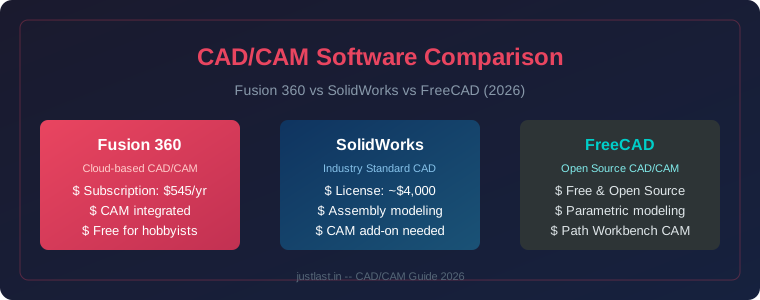
For small and medium manufacturers evaluating their CAD/CAM stack in 2026, the value proposition is increasingly clear: a unified platform that eliminates file transfers, reduces duplicate work, and enforces standards across teams saves more than the subscription cost. Browse CNC tooling and machining accessories on Amazon India for complementary shop-floor tools.
Frequently Asked Questions
What are the key new features in the July 2026 Autodesk Fusion update?
The update includes On-Demand Configurations, Find Similar Components, Hub-Based Threads Library, 3+2 Clearing strategy for CAM, and direct Altium Designer project import for Fusion Electronics.
How does On-Demand Configurations work?
Instead of generating every possible product variant in advance, Fusion creates configurations only when needed during downstream workflows. Existing configurations are reused automatically, and new ones are synchronized back to the configuration table.
What is the 3+2 Clearing strategy and who needs it?
3+2 Clearing allows multiple fixed-axis machining directions within a single CAM operation. It is ideal for manufacturers who need multi-axis reach without the complexity and cost of full 5-axis simultaneous machining.
Can Fusion import Altium Designer projects?
Yes. The July 2026 update adds direct Altium Designer project import into Fusion Electronics, including schematics, PCB layouts, components, nets, footprints, layers, and project structure through a single import process.
Is the Hub-Based Threads Library available to all Fusion subscribers?
The Hub-Based Threads Library is available to Fusion teams using the hub-based collaboration features. It allows centralized management and automatic synchronization of custom thread definitions across devices and users.
How does Find Similar Components help reduce duplicate parts?
It searches the Fusion hub for geometrically similar parts and ranks results by similarity, helping engineers identify existing components before modeling new ones. Filters allow searches by project and component type.
Related Reading
- Mastercam 2027 and Autodesk Fusion July 2026: The Summer of Smarter CAD/CAM Has Arrived
- Adaptive Machining in CNC: Real-Time Control Systems Reshaping Precision Manufacturing in 2026
Sources
- Autodesk Fusion Blog, “5 Key Features in the July 2026 Autodesk Fusion Update That Help Teams Work Faster” (July 14, 2026)
- Autodesk, “July 2026 Major Product Update — What’s New” (July 2026)
- GOEngineer, “What’s New in CAM 2026: SOLIDWORKS, CAMWorks, and More” (November 2025)
Disclosure: Some links in this article are affiliate links. We may earn a commission on qualifying purchases at no additional cost to you.