Key Takeaway: Choosing the right CNC control software — whether open-source GRBL, mid-range Mach3/Mach4, or industrial-grade LinuxCNC — directly affects your machine’s speed, precision, axis count, and overall workflow. This guide compares all three so you can pick the best fit for your workshop.
Table of Contents
1. GRBL — The Open-Source Standard for Hobby CNC
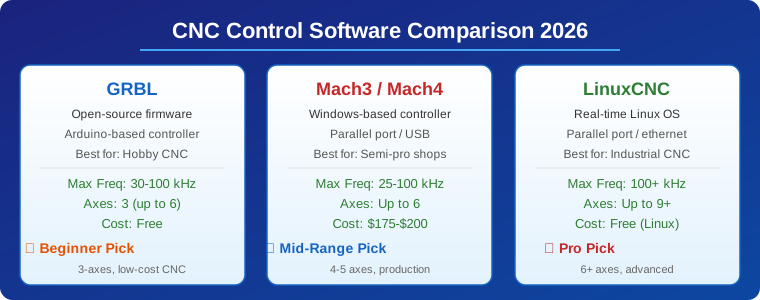
GRBL is the most widely used open-source CNC control software for Arduino-based controllers. It runs directly on an Arduino Uno (ATmega328p) and handles G-code interpretation, step/direction signal generation, and real-time motion control for up to 6 axes. GRBL’s firmware processes G-code commands and generates precise step pulses that drive stepper motor drivers like the DRV8825 or TMC2209.
The GRBL ecosystem has expanded significantly. GRBL 1.1 added important features like homing, limit switches, coolant control, and spindle PWM. For users needing more features, grblHAL runs on more powerful 32-bit microcontrollers (STM32, Teensy, Raspberry Pi Pico) and supports Ethernet, WiFi, SD card, and up to 6 axes. FluidNC (formerly grblHAL based) is another popular fork designed for ESP32, adding WiFi web control.
GRBL communicates over a USB serial connection with a sender application like Candle, Universal G-Code Sender (UGS), bCNC, or LaserGRBL. These senders provide the graphical interface for loading G-code, controlling the machine manually, and visualizing toolpaths.
GRBL Pros: Completely free and open-source, runs on $5 Arduino boards, huge community support, works with nearly every 3-axis hobby CNC, supports common stepper drivers.
GRBL Cons: Limited to 30-100 kHz step frequency (affects maximum feed rate at high microstepping), basic look-ahead (planner buffer of 15-20 moves), no real-time operating system guarantees, limited to USB connectivity only in the base version.
2. Mach3 and Mach4 — The Windows-Based Workhorses
Mach3 has been the de facto standard for semi-professional CNC control since the early 2000s. It runs on Windows XP through Windows 11 and uses a parallel port (LPT) or a USB motion controller (like SmoothStepper, UC100, or PoKeys) to generate step/direction signals. Mach3 supports up to 6 axes with configurable motor tuning per axis.
The engine driver processes G-code with a look-ahead buffer that pre-plans up to several hundred lines, enabling smoother motion at higher feed rates compared to GRBL. Mach3 also supports custom VB scripts for automation, probing routines, and macros.
Mach4, released in 2017, is a complete rewrite that addresses Mach3’s architectural limitations. It uses a plugin-based architecture where the motion control is handled by a separate plugin (e.g., Warp9 ESS, PoKeys, Ethernet SmoothStepper) rather than directly by the PC. This makes Mach4 more stable at higher pulse rates and less susceptible to Windows background processes causing step glitches.
Mach3/4 Pros: Mature software with decades of community knowledge, extensive post-processor support for every CAM package, VB scripting for automation, supports up to 6 axes, works with many third-party motion controllers.
Mach3/4 Cons: Cost ($175 for Mach3, $200 for Mach4), Windows-only, Mach3 has a 25-45 kHz pulse rate limitation on parallel port, requires a dedicated motion controller for best results, Mach3 development has effectively ceased.
3. LinuxCNC — Real-Time Control for Industrial Machines
LinuxCNC (formerly EMC2) runs on a real-time Linux kernel, providing deterministic timing that is essential for industrial-grade CNC control. Unlike GRBL or Mach3, where the PC operating system can introduce timing jitter, LinuxCNC’s real-time kernel extension (RTAI or PREEMPT-RT) guarantees that step pulses arrive exactly when needed.
LinuxCNC supports up to 9 axes (or more with custom configurations) and uses a HAL (Hardware Abstraction Layer) system that lets you wire software components together like hardware. This makes it incredibly flexible — you can configure dual-loop servos, multi-head machines, rotary axes, and custom kinematic systems that would be impossible with GRBL or Mach3.
The standard interface is Axis (a graphical GUI with G-code display, DRO, and toolpath preview), but other interfaces like Touchy, Gscreen, and PyVCP are available for touch screens and custom panels. LinuxCNC also supports PLC-style ladder logic and can control machines with advanced features like rigid tapping, synchronized axes, and spindle orientation.
LinuxCNC Pros: Free and open-source, true real-time performance (100+ kHz step rates), up to 9+ axes, HAL-based modular configuration, supports servo drives with encoder feedback, industrial reliability, active development community.
LinuxCNC Cons: Requires a dedicated PC running real-time Linux (not a simple install), steeper learning curve for configuration, less polished user interface than Mach4, limited 3D toolpath visualization, requires specific hardware for best results (parallel port or Mesa FPGA cards).
4. Head-to-Head Comparison
Here’s how the three main CNC control software platforms stack up across the most important parameters for a workshop decision:
| Feature | GRBL | Mach3/Mach4 | LinuxCNC |
|---|---|---|---|
| Cost | Free | $175-$200 | Free |
| Max Step Rate | 30-100 kHz | 25-100 kHz | 100+ kHz |
| Max Axes | 3 (6 in grblHAL) | Up to 6 | 9+ |
| Look-Ahead | 15-20 moves | 100+ moves | 1000+ moves |
| OS | Cross-platform | Windows only | Linux RT |
| Real-Time | No | No (PC-based) | Yes (RT kernel) |
| Best For | Hobby 3-axis | Semi-pro shops | Industrial production |
5. How to Choose the Right CNC Control Software
Your choice of CNC control software depends on three factors: the number of axes you need, your required feed rate and precision, and your budget and technical comfort level.
Choose GRBL if: You are building or running a 3-axis desktop CNC router, engraving machine, or laser cutter. You are comfortable flashing firmware onto an Arduino and troubleshooting serial connections. You want the lowest possible entry cost and are happy with the hobbyist ecosystem. For most 3018, 6040, and Shapeoko-style machines, GRBL is the correct answer.
Choose Mach3/Mach4 if: You run a small production shop with 4-5 axis machines, you need to maintain compatibility with legacy G-code and tooling, you prefer Windows-based tools, and you are willing to invest in a motion controller like the Ethernet SmoothStepper or UC100 for reliable performance. Mach4 is worth the upgrade over Mach3 for its better engine and plugin architecture.
Choose LinuxCNC if: You run a production environment where a missed step means a scrapped part. You need 6+ axes, servo control with encoder feedback, or custom kinematics. You have the technical capability to install and configure a real-time Linux system. LinuxCNC is the choice of serious machine shops running industrial CNC mills and lathes.
Frequently Asked Questions
Can I run GRBL on a 32-bit microcontroller?
Yes. While standard GRBL runs on 8-bit Arduino Uno, grblHAL runs on STM32, Teensy 4.0, Raspberry Pi Pico, and other 32-bit platforms. grblHAL supports higher step rates, more axes, and features like SD card, networking, and WiFi.
Is Mach3 still supported in 2026?
Mach3 is in maintenance mode with no new development. Mach4 is the actively developed successor. However, Mach3 remains functional and widely used because of its huge existing user base and compatible hardware ecosystem.
Does LinuxCNC work with USB motion controllers?
LinuxCNC primarily uses parallel port or Mesa FPGA cards for real-time step generation. USB-based controllers are generally avoided because USB lacks real-time guarantees. However, some Ethernet-based controllers work with LinuxCNC through custom HAL components.
Which CNC control software has the best 3D preview?
Mach4 has the most polished 3D toolpath visualization among the three. GRBL depends on its sender application (UGS and bCNC offer decent previews). LinuxCNC’s Axis interface provides basic 2.5D preview but is not competitive for complex 3D surfaces.
Can I run GRBL and LinuxCNC on the same machine?
Not simultaneously, since they are different control platforms. However, you can dual-boot a PC with Windows (for GRBL sender) and Linux (for LinuxCNC) if your machine uses a parallel port interface.
Related Reading
- Fusion 360 CAM Guide: Complete CNC Toolpath Creation Workflow
- CNC Spindle vs Router: Choosing the Right Cutting Head
- AI in CNC Machining: Predictive Maintenance and Toolpath Optimization
Sources
- GRBL — Github Repository
- Mach4 CNC Control Software — Newfangled Solutions
- LinuxCNC Official Site
- grblHAL — 32-bit GRBL Port
Disclosure: This post contains affiliate links to products recommended based on our testing. We may earn a commission if you purchase through these links.