Key Takeaway: Fusion 360 and SolidWorks serve different manufacturing needs in 2026. Fusion 360 offers integrated CAM at an affordable price (₹5,000/month) with the same HSM kernel that powers HSMWorks, making it ideal for small shops and single machinists. SolidWorks remains the industry standard for large assemblies and professional drawings but requires expensive CAM add-ons (₹50,000+). Many shops run both — SolidWorks for design and Fusion for CAM.
Table of Contents

1. Platform Overview
Fusion 360 (Autodesk) is a cloud-connected, subscription-only CAD/CAM/CAE platform that runs on Windows, macOS, and even mobile devices. Its key differentiator is that CAM is built into the base subscription — no separate add-on required. The CAM kernel is the HSM engine, the same technology that powered HSMWorks before Autodesk acquired it.
SolidWorks (Dassault Systèmes) is the de-facto industry standard for parametric 3D mechanical design. It is a desktop application (Windows only) available via perpetual license or subscription. SolidWorks does not ship with built-in CAM — it requires third-party add-ons like CAMWorks, Mastercam for SolidWorks, or SolidCAM.
2. CAM Integration: The Critical Difference
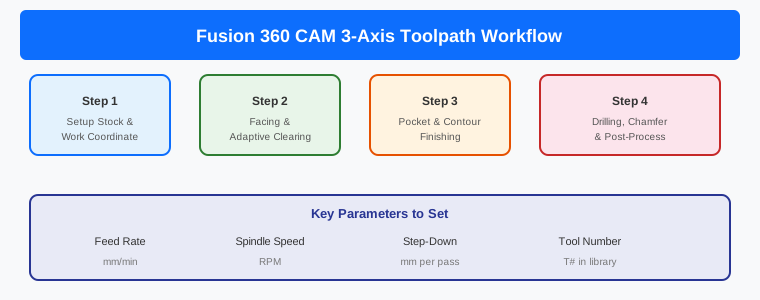
Fusion 360 CAM
- Built-in CAM in the Manufacture workspace — shares the same file as the design
- 2.5-axis, 3-axis milling and turning included in the base subscription
- 3+2 and simultaneous multi-axis available via paid Machining Extension
- Massive free, editable library of post-processors
- No export/import step — when you modify the model, setups reference updated geometry
SolidWorks CAM Options
- SolidWorks CAM (CAMWorks engine): Bundled with SolidWorks Professional/Premium. Uses Technology Database (TechDB) for automatic feature recognition on prismatic geometry. Standard tier is 2.5-axis only.
- Mastercam for SolidWorks: Premium CAM with extensive toolpath library. Uses SolidWorks geometry directly. Separate licensing.
- SolidCAM: Strong multi-axis and turning support. iMachining technology is genuinely differentiated for hard material roughing.
- HSMWords: Being discontinued by Autodesk — critical update for current users (see section 6).
3. Head-to-Head Feature Comparison
| Feature | Fusion 360 | SolidWorks |
|---|---|---|
| CAM Kernel | HSM (same as HSMWorks) | CAMWorks/Mastercam/SolidCAM (add-ons) |
| CAM Cost | Included in ₹5,000/month | ₹50,000-1,50,000 additional |
| Multi-Axis Support | 3+2 and 5-axis (Machining Extension) | Depends on add-on tier |
| Assembly Handling | Slows above ~300 unique parts | Handles 1,000+ parts (SpeedPak) |
| Professional Drawings | Basic (limited GD&T) | Advanced with full GD&T, BOMs |
| Sheet Metal | Good for basic work | Mature with bend tables, K-factor |
| Platform | Mac, Windows, Cloud, Mobile | Windows only |
| Data Management | Cloud-native (Autodesk cloud) | Local files or 3DEXPERIENCE cloud |
4. Pricing in India (2026)
Fusion 360: ₹5,000/month (annual subscription) or ₹60,000/year. Includes CAD, CAM, CAE, and PCB design. The Machining Extension for multi-axis adds approximately ₹2,500/month extra. A 30-day free trial is available.
SolidWorks: ₹95,000-1,50,000/year for a standard subscription. SolidWorks CAM Standard is included with an active subscription. SolidWorks CAM Professional adds 3+ axis support at additional cost. Mastercam adds another ₹50,000-1,00,000 depending on the tier.
5. Which One Should You Choose?
Choose Fusion 360 if:
- You run a small CNC shop with 1-3 machinists
- You want integrated CAM without paying extra
- Your assemblies stay under ~300 unique parts
- You work on both Mac and Windows
- Cloud collaboration is valuable for your workflow
- Budget is a primary concern
Choose SolidWorks if:
- You design large assemblies with hundreds or thousands of components
- You need professional manufacturing drawings with full GD&T
- Your shop does heavy sheet metal or weldments
- You need the largest pool of trained operators to hire from
- You want a full pipeline from CAD to CAM to ERP
Consider running both:
Many shops settle on a split: SolidWorks for design (large assemblies, professional drawings) and Fusion for CAM (integrated toolpath generation, lower cost). This is a common and practical setup in 2026, especially for shops that have existing SolidWorks design workflows but want Fusion’s CAM capabilities without migrating everything.
6. Important: HSMWorks Is Being Discontinued
If you are a SolidWorks shop currently using HSMWorks, you face a concrete decision. Autodesk has announced that HSMWorks for SolidWorks is being decommissioned — the product is in maintenance mode only. Autodesk’s intended migration path is to Fusion 360’s Manufacture workspace.
Your options:
- Migrate CAM to Fusion 360: The toolpath quality is identical (same HSM kernel). Makes sense if you can also move design work to Fusion, or are willing to use a STEP-based workflow for CAM-only.
- Switch to SolidWorks CAM/CAMWorks: Keeps you in SolidWorks with TechDB feature recognition on prismatic parts.
- Switch to SolidCAM or Mastercam: Higher capability ceiling but higher cost and steeper learning curve.
Frequently Asked Questions
Is Fusion 360 good enough for professional CNC machining?
Yes, for simple to moderately complex parts, brackets, enclosures, and small assemblies. The HSM CAM kernel delivers professional-quality toolpaths. For large assemblies, complex surfacing, and heavy sheet metal, SolidWorks is the stronger choice.
Can Fusion 360 replace SolidWorks?
For some workflows, yes. If you do product design, prototyping, or CNC work at a small to medium scale, Fusion can handle it. For large assemblies, advanced simulation, or detailed manufacturing drawings, SolidWorks remains stronger.
Which has better CAM — Fusion 360 or SolidWorks?
Fusion 360 offers better integrated CAM value because it is built-in at no extra cost. The HSM kernel produces toolpaths identical to HSMWorks. SolidWorks CAM (CAMWorks) has TechDB automatic feature recognition which is a real productivity multiplier for prismatic part families.
Related Reading
Sources
- CadShift — Fusion 360 Integrated CAD/CAM vs SolidWorks CAM
- CADGuide.tools — Fusion 360 vs SolidWorks 2026 Comparison
- SourceCAD — SolidWorks vs Fusion 360: Which to Learn
- Morphos3D — SOLIDWORKS vs Fusion vs Inventor
Disclosure: This post contains affiliate links. As an Amazon Associate, justLast.in earns from qualifying purchases.