Key Takeaway: The best oscilloscope for embedded development is not the fastest or cheapest — it is the one whose bandwidth, channel count and protocol decode match the signals you actually debug, typically 100 MHz+ with I2C, SPI, UART and CAN decoding.
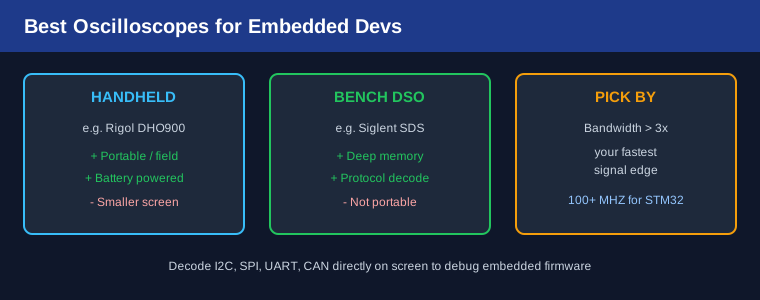
Table of Contents
1. Why Every Embedded Dev Needs a Scope
A multimeter tells you a voltage exists; an oscilloscope shows you what the signal is doing. When an I2C bus hangs, when a PWM output is jittery, or when a reset line glitches during a motor start, only a scope reveals the timing. For firmware and hardware debugging alike, it is the single most useful instrument on the bench.
2. Bandwidth and Sample Rate Rules
Bandwidth should be at least three times your fastest signal edge. A 100 MHz scope comfortably shows a 33 MHz SPI clock and the edges of most STM32 and ESP32 signals. Sample rate matters too — you want 5-10x the bandwidth per channel so fast edges are not aliased. For analog sensor work, look at vertical resolution: 8-bit is standard, but 12-bit “HD” scopes resolve small ripple far better.
3. Handheld vs Bench DSO
Handheld scopes (for example the Rigol DHO900 handheld series) run on battery, fit in a tool bag, and are perfect for field service on installed machines. Bench DSOs (Siglent SDS, Rigol DS) offer larger screens, deeper memory and better trigger systems for bench debugging. If you work at a single bench, a bench scope wins. If you climb into panels on the floor, a handheld earns its place.
4. Protocol Decode: The Feature That Pays For Itself
Hardware serial decode for I2C, SPI, UART and CAN turns a squiggly line into readable hex frames on screen. Without it, you are counting bits by eye. For embedded work this is the difference between a five-minute fix and an afternoon of pain. Confirm the scope decodes the buses your project uses before buying — some entry models decode I2C/SPI/UART but not CAN.
The same bus discipline applies to logic analysis; for digital-only debugging our oscilloscope vs logic analyzer guide explains when each tool is right.
5. Our 2026 Picks by Budget
- Under $200: Entry 50-100 MHz two-channel DSO — fine for Arduino-level I2C/SPI and basic analog.
- $300-$600: 100 MHz two- or four-channel scope with serial decode — the sweet spot for STM32 and ESP32 work.
- $600-$1200: 100-200 MHz four-channel bench scope with deep memory and CAN decode — serious embedded and motor debugging.
- Field use: A battery handheld with the same decode set for on-machine service calls.
6. Debugging Workflow Tips
Trigger on the anomaly, not the clock — a rising edge on an interrupt line or a glitch filter catches the event you care about. Use the deepest memory you can for single-shot captures, then zoom. Label channels by signal name so a captured frame reads like a schematic. Store setups per project so the next session starts in seconds. For probe technique and grounding, pair the scope with a good soldering station when you are reworking the board you are measuring.
Frequently Asked Questions
Is 100 MHz enough for STM32 work?
For the vast majority of STM32 and ESP32 signals, yes. You only need more when probing high-speed USB, Ethernet or fast parallel buses.
Two channels or four?
Two is enough for most serial debugging. Four helps when you must watch a clock, data and two control lines at once, or compare phases.
Can a logic analyzer replace a scope?
No. A logic analyzer sees digital levels only; a scope shows analog shape, ringing and noise that cause real failures.
Do I need a real-time spectrum option?
Only for EMI or RF work. Most embedded developers do not need it.
Related Reading
- Oscilloscope vs Logic Analyzer
- Best Soldering Stations for Beginners
- Fluke 117 vs Klein MM700 Multimeter
Sources
- Rigol Technologies — Test Equipment
- Siglent Technologies — Oscilloscopes
- W2AEW — Oscilloscope Tutorials
Disclosure: This post contains affiliate links. If you buy through them, justLast.in may earn a commission at no extra cost to you.