Key Takeaway: The TCL D2 Pro Matter brings palm vein biometric recognition to Matter over Thread at $199.99, working with Apple Home, Google Home, Alexa and SmartThings without requiring TCL’s app or cloud services.
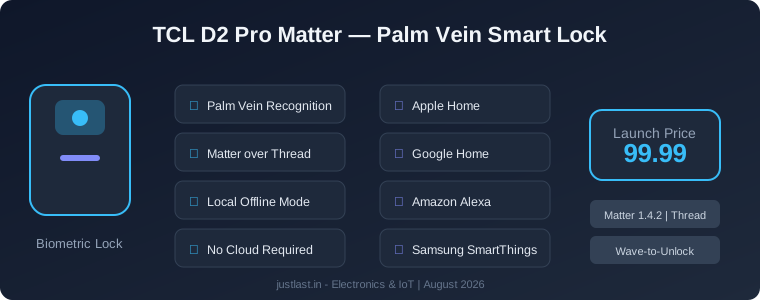
Table of Contents
1. What Is the TCL D2 Pro Matter?
The TCL D2 Pro Matter is an upgraded version of TCL’s palm vein smart lock that adds Matter over Thread connectivity and a local offline control mode. Launched in August 2026 at $199.99, it is one of the first smart locks to combine contactless biometric authentication with the universal Matter smart home standard.
Unlike fingerprint or face recognition locks that scan surface features, the D2 Pro reads the unique vein patterns beneath your skin using near-infrared light. This makes it extremely difficult to spoof — you cannot photograph or replicate a palm vein pattern the way you might with a fingerprint.
The lock is available from TCL’s website and Amazon. It comes in a single deadbolt form factor designed for standard US door preparations.
2. How Palm Vein Recognition Works
Palm vein biometrics use near-infrared (NIR) LEDs to illuminate the blood vessels beneath the surface of your palm. Deoxygenated hemoglobin in the veins absorbs the NIR light, creating a unique vascular pattern that the lock’s sensor captures and converts into a digital template.
Advantages Over Fingerprint Scanners
- Anti-spoofing: Vein patterns are internal and cannot be lifted from surfaces like fingerprints
- Contactless: No need to touch a sensor — wave your hand in front of the lock
- Works with wet or dirty hands: Unlike optical fingerprint readers, vein recognition is unaffected by surface moisture or grime
- Speed: TCL claims recognition in under 0.5 seconds
Limitations
- Palm vein sensors require the hand to be within 5-15 cm of the sensor
- Users with certain circulatory conditions may have difficulty with vein detection
- The lock stores biometric data locally on the device — it never leaves the lock
3. Matter over Thread: Why It Matters
The biggest upgrade in this version is Matter over Thread connectivity. Matter is the universal smart home standard backed by Apple, Google, Amazon and Samsung. Thread is a low-power mesh networking protocol designed specifically for IoT devices.
What This Means in Practice
With Matter built into the lock, you can:
- Add it to Apple Home, Google Home, Amazon Alexa or Samsung SmartThings using a simple QR code scan
- Control it from any compatible app without needing TCL’s proprietary software
- Receive firmware updates through your smart home platform of choice
- Use it with automations across different ecosystems simultaneously
Thread networking means the lock connects through your existing Thread border router (such as an Apple HomePod Mini, Google Nest Hub, or Amazon Echo 4th Gen) instead of requiring a separate hub. Thread devices create a mesh network that becomes more robust as more devices are added.
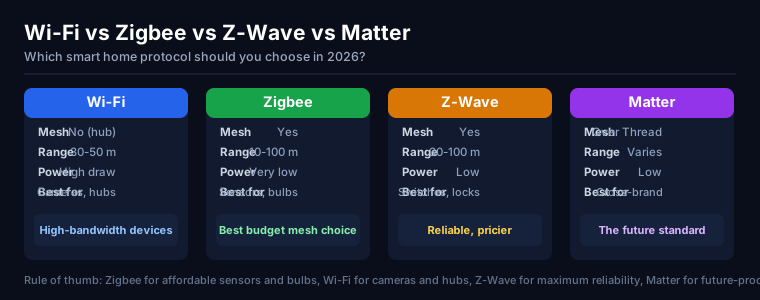
For a deeper comparison of smart home protocols, see our guide on Wi-Fi vs Zigbee vs Z-Wave vs Matter.
4. Local Control Mode
The TCL D2 Pro Matter introduces a Local Mode that operates entirely offline. When enabled, the lock communicates only through Thread and Bluetooth — no Wi-Fi connection and no cloud services required.
This addresses a common concern among privacy-conscious users who do not want their door lock behavior transmitted to external servers. In Local Mode:
- All authentication and lock/unlock commands happen on the local Thread network
- No data is sent to TCL’s cloud servers
- The lock can still be managed through the Yale Access or smart home platform app locally
- Remote access from outside the home network is disabled
For users who want the privacy benefits of local control but also want remote access when away from home, the lock can be switched between Local Mode and standard cloud-connected mode through the companion app.
5. Smart Home Platform Compatibility
The TCL D2 Pro Matter works with all four major smart home platforms out of the box:
- Apple Home: Requires a HomePod Mini, Apple TV 4K, or HomePod as Matter controller and Thread border router
- Google Home: Requires a Google TV Streamer, Nest Hub Max, Nest Hub (2nd Gen), or Nest Wifi Pro
- Amazon Alexa: Requires an Echo 4th Gen, Echo Show 10, or Eero 6+ as Thread border router
- Samsung SmartThings: Requires a SmartThings Hub v3 or Station with Thread support
One important note: the D2 Pro does not support Aliro, the upcoming Apple-backed standard for using your phone as a digital key via NFC. If native smartphone wallet credentials are important to you, you may want to wait for Aliro-compatible locks later in 2026.
6. Setup and Installation Guide
Setting up the TCL D2 Pro Matter follows a straightforward process:
Step 1: Physical Installation
Remove your existing deadbolt and install the TCL D2 Pro in its place. The lock fits standard US single-cylinder deadbolt preparations. You will need a Phillips screwdriver and about 20 minutes.
Step 2: Insert Batteries
The lock runs on 4 AA batteries (included). TCL estimates 12 months of battery life under normal use.
Step 3: Matter Commissioning
- Open your smart home app (Apple Home, Google Home, etc.)
- Scan the QR code on the lock’s quick start guide or on the lock itself
- Follow the on-screen prompts to add the lock to your Thread network
- Set up user codes and biometric profiles through the app
Step 4: Palm Vein Enrollment
During initial setup, the app will guide you through enrolling your palm vein pattern. Hold your palm approximately 10 cm from the sensor and follow the prompts. You can enroll multiple users.
7. Specifications and Comparison
| Feature | TCL D2 Pro Matter | Yale Smart Lock (Matter) | Schlage Encode Plus |
|---|---|---|---|
| Price | $199.99 | $189.99 | $299.99 |
| Biometric | Palm Vein | None | None |
| Protocol | Matter over Thread | Matter over Thread | Thread / HomeKit |
| Local Control | Yes | No | Partial |
| Battery Life | ~12 months | ~12 months | ~12 months |
8. Frequently Asked Questions
Does the TCL D2 Pro Matter work with Apple Home?
Yes. The lock supports Matter over Thread, which means it works with Apple Home through any HomePod or Apple TV 4K that serves as a Matter controller and Thread border router. Pair using the Home app’s QR code scan process.
Can the lock be opened without the app?
Yes. You can unlock the door using palm vein recognition directly at the lock, or by entering a keypad code. The app is only needed for remote access, user management and automations.
How many palm vein profiles can the lock store?
The TCL D2 Pro supports up to 50 user profiles, which can include both palm vein biometric patterns and numeric keypad codes.
Does it require Wi-Fi?
No. With Thread networking, the lock communicates through your Thread border router without needing a direct Wi-Fi connection. If you prefer Wi-Fi connectivity, that option is also available.
Related Reading
- Best Smart Door Locks 2026: Top Picks for Wi-Fi, Keypad, and Premium Budgets
- Matter 1.4 Smart Home Guide: Energy Devices, Thread Routers and Multi-Admin in 2026
- Wi-Fi vs Zigbee vs Z-Wave vs Matter: Complete Smart Home Protocol Comparison for 2026
- Best Smart Home Hubs 2026: Home Assistant vs SmartThings vs Hubitat vs Apple
Sources
- Gizmodo – TCL’s Jedi-Like Smart Lock Is Now Even Better
- Matter Alpha – TCL D2 Pro Matter Palm Vein Smart Lock
- Tech Digest – TCL D2 Pro Smart Lock with Palm Vein Technology
Disclosure: This post contains affiliate links. If you purchase through these links, we may earn a commission at no additional cost to you. Our recommendations are based on independent research and testing.