Key Takeaway: OPC UA is the industry-standard protocol for secure, vendor-neutral factory automation — and implementing it across your PLCs and edge devices unlocks real-time data exchange without lock-in.
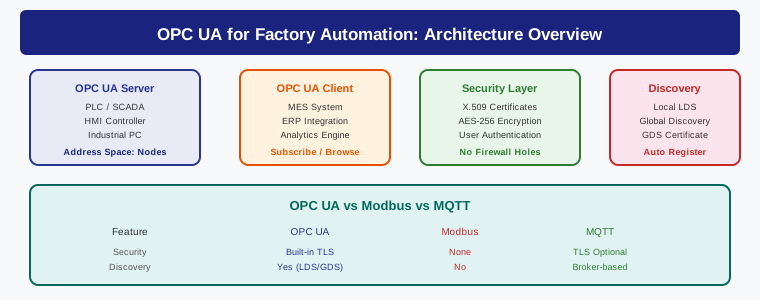
Table of Contents
- What Is OPC UA and Why It Matters
- OPC UA Architecture Deep Dive
- PLC Integration: Step-by-Step Implementation
- Security Configuration for Factory Floor
- OPC UA vs Modbus vs MQTT: Protocol Comparison
- Real-World Factory Applications
- Getting Started: Tools and Resources
- Frequently Asked Questions
- Related Reading
What Is OPC UA and Why It Matters
Factory floors are filled with equipment from dozens of manufacturers — Siemens PLCs, Allen-Bradley drives, Beckhoff controllers, Fanuc robots — each speaking its own proprietary language. Getting these devices to share data has historically meant custom drivers, protocol converters, and endless integration headaches.
OPC UA (Unified Architecture) solves this problem by providing a single, vendor-neutral communication standard. Originally developed by the OPC Foundation as a successor to classic OPC (which was Windows-only and COM/DCOM based), OPC UA runs natively on any operating system and works across TCP/IP networks.
For opc ua factory automation deployments, this means one integration framework that connects every device on the plant floor — from legacy Modbus sensors to modern IoT gateways — into a unified data model. No more writing custom drivers for every piece of equipment.
The protocol stack provides four critical capabilities:
- Platform independence — runs on Windows, Linux, RTOS, embedded devices, and cloud platforms
- Built-in security — encryption, authentication, and authorization are part of the standard, not bolted on
- Semantic data modeling — devices expose their data with rich metadata, not just raw register values
- Scalability — from a single PLC to thousands of connected devices across multiple sites
The OPC Foundation currently has over 900 member companies, including Siemens, Rockwell Automation, Beckhoff, ABB, and Honeywell. This is not a niche protocol — it is the de facto standard for industrial interoperability.
OPC UA Architecture Deep Dive
Understanding the OPC UA architecture is essential before implementing it on the factory floor. The standard defines a Client-Server model and a newer PubSub (Publish-Subscribe) model. Most factory automation deployments use the Client-Server model for device configuration and monitoring, while PubSub is gaining traction for high-frequency data streaming.
The Information Model
Unlike Modbus (which exposes flat register addresses) or MQTT (which publishes raw topics), OPC UA uses a rich, object-oriented information model. Each device exposes its data as a structured address space of nodes and references — think of it as a browsable tree of objects, variables, methods, and events.
For example, an OPC UA server on a Siemens S7-1500 PLC does not just expose register 40001. It exposes a structured object like Objects → Machines → Conveyor01 → Speed with metadata including engineering units (m/min), data type (Float), valid range (0-120), and timestamp. Any OPC UA client can browse this structure and understand the data without external documentation.
Transport and Discovery
OPC UA supports multiple transport protocols:
- TCP Binary (opc.tcp) — the most common for factory automation; fastest, lowest overhead
- HTTPS (httpsopc) — works through firewalls and proxies; useful for cloud integration
- MQTT (opc.mqtt) — OPC UA over MQTT for IoT edge scenarios
- AMQP — for enterprise messaging integration
Discovery is handled through Local Discovery Servers (LDS) that allow clients to automatically find OPC UA servers on the network without hardcoded IP addresses. In factory environments, the LDS acts as a directory service for all connected equipment.
Profiles and Conformance
The OPC Foundation defines conformance classes (or profiles) that specify exactly what capabilities a server or client must support. Key profiles for factory automation include:
- Base Server Behaviour — minimal server implementation
- Standard Data Access — reading and writing variables with timestamps and quality
- Enhanced Data Access — history read, historizing, and aggregation
- Method Call — invoking methods on server objects (e.g., start/stop commands)
- Alarm & Conditions — structured alarm management with acknowledgment
Always verify that your PLC vendor supports the profiles you need before purchasing. A Siemens S7-1500 supports the full suite; some smaller controllers may only implement a subset.
PLC Integration: Step-by-Step Implementation
Integrating OPC UA into your factory automation stack follows a structured approach. Here is a practical implementation guide that works across major PLC brands.
Step 1: Enable the OPC UA Server on Your PLC
Most modern PLCs ship with a built-in OPC UA server or support it through a license add-on:
- Siemens S7-1200/S7-1500: Enable OPC UA in TIA Portal under the CPU’s OPC UA settings. Set the server port (default 4840), configure certificate stores, and define the publish interval.
- Rockwell ControlLogix: Use the FactoryTalk Linx Gateway as the OPC UA server, connecting to Allen-Bradley PLCs via EtherNet/IP.
- Beckhoff TwinCAT: The TwinCAT OPC UA Server runs as a separate ADS client — add the OPC UA server license and configure it through TwinCAT XAE.
- Mitsubishi iQ-R: Add the OPC UA module (LD77G) or use the built-in OPC UA server in the latest firmware.
At minimum, configure the server endpoint (hostname:port), enable anonymous or certificate-based authentication, and set the scan rate for your published variables.
Step 2: Define Your Data Model
This is where OPC UA’s information model shines. Instead of publishing raw registers, define meaningful variable structures in your PLC program:
- Machine Status objects — Running, Stopped, Faulted, with timestamps
- Process Variables — temperature, pressure, speed with engineering units and limits
- Production Counters — parts produced, reject count, cycle time
- Diagnostic objects — motor current, vibration levels, error codes
Naming conventions matter. Use consistent hierarchical naming: Machines/Line01/Conveyor01/Speed rather than cryptic register names. Future integrations (SCADA, MES, cloud analytics) will thank you.
Step 3: Configure the OPC UA Client
On the client side — whether it is a SCADA system, MES, or edge gateway — configure the connection parameters:
- Enter the server endpoint URL (e.g.,
opc.tcp://192.168.1.10:4840) - Select the security mode (None, Sign, or SignAndEncrypt)
- Choose the authentication method (certificate, username/password, or anonymous)
- Subscribe to the required nodes with your desired publish interval
- Verify data quality and timestamps are valid
Step 4: Test and Validate
Use a standalone OPC UA client for initial testing before deploying production integrations. The two most widely used tools are:
- UaExpert (by Unified Automation) — free, cross-platform, excellent for browsing address spaces and monitoring subscriptions
- Prosys OPC UA Browser — Java-based, supports advanced features like method calls and historical access
Test read/write operations, method calls, subscription callbacks, and reconnection behavior. Simulate network disruptions to verify your error handling.
Security Configuration for Factory Floor
Security is not optional in OPC UA factory automation deployments — it is built into the protocol. Unlike Modbus (which has zero security) or MQTT (which requires additional configuration for TLS), OPC UA mandates security at the transport level.
Certificate-Based Authentication
Each OPC UA server and client has an X.509 certificate. On first connection, the client must trust the server’s certificate (and vice versa). This creates a mutual trust model:
- Application certificates — identify the server or client application
- User certificates — authenticate individual users for role-based access
- Certificate stores — managed per-device, with revocation lists for decommissioned equipment
Security Policies
OPC UA defines several security policies with increasing strength:
- Aes128-SHA256-RSA-OAEP — baseline, widely supported
- Aes256-SHA256-RSA-PSS — recommended for new installations
- Aes256-SHA384-ECC-P256 — highest security, requires modern hardware
Always use SignAndEncrypt for production deployments. Never leave security mode set to None on a factory network — even air-gapped networks can be compromised.
Network Configuration
OPC UA operates on a single TCP port (default 4840), which simplifies firewall configuration. For factory automation networks:
- Allow port 4840 (TCP) between the server and authorized clients only
- Disable anonymous access in production — use certificates or username/password
- Enable audit logging to track connection attempts and data changes
- Segment OPC UA traffic on a dedicated VLAN for critical control systems
OPC UA vs Modbus vs MQTT: Protocol Comparison
Choosing the right protocol is a critical decision. Here is how OPC UA factory automation stacks up against the two most common alternatives.
| Feature | OPC UA | Modbus TCP | MQTT |
|---|---|---|---|
| Data Model | Rich, semantic, object-oriented | Flat register addresses | Raw topics with no metadata |
| Security | Built-in encryption, auth, signing | None (cleartext only) | TLS optional, requires config |
| Discovery | Built-in LDS discovery | None (manual IP config) | Broker-based |
| Publish Model | Client-Server + PubSub | Master-Slave only | Pub-Sub only |
| Best For | Full factory automation with security | Simple sensor/actuator networks | IoT, cloud, lightweight telemetry |
In practice, most modern factories use a combination. OPC UA handles the high-value integration between PLCs, SCADA, and MES. MQTT carries lightweight telemetry to cloud platforms. Modbus persists on legacy equipment where replacement is not yet justified.
Real-World Factory Applications
Automotive Assembly Line
An automotive manufacturer connected 200+ OPC UA servers across welding, painting, and assembly cells. Each server exposes machine status, cycle times, quality measurements, and alarm data. The MES system subscribes to all servers through a central OPC UA aggregator, providing real-time OEE visibility across the entire plant — without a single custom driver.
Pharmaceutical Batch Processing
Pharmaceutical production requires strict data integrity for regulatory compliance (FDA 21 CFR Part 11). OPC UA provides the audit trail, electronic signatures, and timestamp integrity needed. Each batch parameter — temperature profiles, pressure curves, mixing speeds — is recorded with OPC UA Historian for complete traceability.
Packaging Line Integration
A food packaging facility integrated PLCs from three different vendors (Siemens, Mitsubishi, Omron) using OPC UA. The unified data model allowed a single SCADA application to monitor all lines without vendor-specific drivers. When they added a new filling machine, it was online and visible in the SCADA within hours — not weeks.
Getting Started: Tools and Resources
If you are ready to implement OPC UA factory automation in your facility, here is the recommended path:
- Assess your PLC fleet — check which devices support OPC UA natively and which need add-on servers or gateways
- Start with a pilot line — choose one production line to prove the integration before scaling plant-wide
- Use open-source tools first — the open62541 library provides a full OPC UA stack in C, suitable for embedded and gateway devices
- Invest in certificate management — set up a proper PKI infrastructure early; retrofitting certificates across hundreds of devices is painful
- Plan for Historian integration — OPC UA’s historical access capability makes time-series data available without additional middleware
For smaller operations, OPC UA gateway devices from vendors like HMS (Anybus), Softing, or Matrikon can bridge legacy Modbus/serial equipment to OPC UA without replacing PLCs.
Frequently Asked Questions About OPC UA Factory Automation
Is OPC UA factory automation compatible with legacy PLCs?
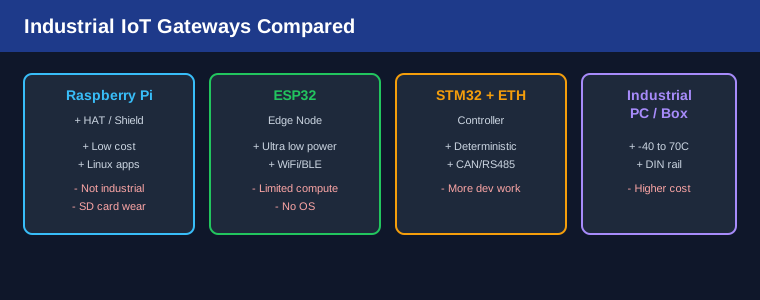
Yes. OPC UA gateway devices can bridge older PLCs (S7-300, MicroLogix, FX3U) that lack native OPC UA support. The gateway runs an OPC UA server and translates between the legacy protocol (Modbus, PROFIBUS, DeviceNet) and OPC UA. Vendors like Softing, HMS Anybus, and Matrikon offer commercial gateways for this purpose. Alternatively, open-source solutions using open62541 can be deployed on Raspberry Pi or industrial PCs as custom gateways.
How much does it cost to implement OPC UA factory automation?
Costs vary significantly. Many modern PLCs (Siemens S7-1500, Beckhoff CX series, Rockwell ControlLogix) include OPC UA server functionality at no extra cost. If your PLCs lack native support, OPC UA gateway hardware ranges from $200 (basic Modbus-to-UA) to $2,000+ (multi-protocol with edge computing). Software licensing for OPC UA clients (SCADA, MES) is typically already included in those platforms. The main hidden cost is the engineering time for configuration, testing, and certificate management — budget 40-80 hours for a pilot deployment.
Can OPC UA factory automation work over wireless networks?
OPC UA can operate over any TCP/IP network, including Wi-Fi and industrial wireless (5G, WirelessHART). However, the Client-Server model is sensitive to latency and packet loss. For wireless deployments, consider OPC UA PubSub over UDP multicast, which is more tolerant of network variability. Use QoS 1 (at-least-once delivery) with MQTT as a transport for best reliability over wireless. Always test thoroughly — industrial Wi-Fi has different characteristics than office networking.
How does OPC UA compare to Industry 4.0 and IIoT platforms?
OPC UA is a transport and data modeling layer, not a complete IIoT platform. It is the foundation that most Industry 4.0 platforms build on. Solutions like Siemens MindSphere, AWS IoT SiteWise, and Azure Industrial IoT all accept OPC UA as a primary data source. The OPC UA Companion Specifications extend the base standard with domain-specific information models for specific industries — Packaging (PackML), Machine Tools (UMATI), and Discrete Automation (PLCopen). Start with OPC UA as your plant-floor data backbone, then connect it to higher-level IIoT analytics platforms as needed.
Related Reading
- MQTT for Industrial IoT: Complete Guide with ESP32 Examples
- OPC UA vs MQTT in 2026: Choosing the Right Industrial IoT Protocol for Your Factory
- PLC vs Industrial PC vs Edge Controller: Complete Comparison for Factory Automation in 2026
Sources
- OPC Foundation — What is OPC UA
- Beckhoff — TwinCAT OPC UA Server
- Siemens — S7-1500 OPC UA Integration
- open62541 — Open Source OPC UA Implementation
Disclosure: This article contains affiliate links. If you purchase through these links, justLast.in earns a small commission at no additional cost to you. We only recommend products and tools we have tested or thoroughly evaluated for industrial automation use.