Key Takeaway: Home Assistant is the most powerful and flexible smart home hub in 2026 with 2,000+ integrations and full local control, while Samsung SmartThings offers the easiest setup for beginners — your choice depends on technical comfort level.
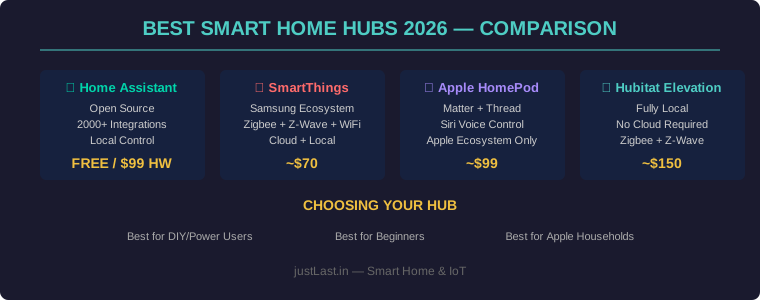
Table of Contents
1. Why You Need a Smart Home Hub
Individual smart devices — WiFi bulbs, smart plugs, sensors — work fine on their own. But once you want devices from different brands to talk to each other, trigger automations, and work without relying on cloud servers, you need a smart home hub.
A smart home hub acts as the brain of your home automation system. It connects to devices via WiFi, Zigbee, Z-Wave, Bluetooth, and the new Matter protocol, then lets you create rules like “when motion is detected at 11 PM, turn on hallway lights at 20%.” The best hubs run locally, meaning your automations work even when your internet goes down.
For ESP32-based projects, having a hub that supports MQTT or the ESPHome integration opens up unlimited DIY possibilities.
2. Top 4 Smart Home Hubs Compared
1. Home Assistant — Best Overall (Power Users)
Home Assistant is the gold standard for serious home automation. Open-source, runs on a Raspberry Pi ($99 for the Home Assistant Green), and connects to over 2,000 device types. Its YAML-based automation engine and visual editor give you complete control over every aspect of your smart home.
- Protocols: WiFi, Zigbee, Z-Wave, Bluetooth, Matter, Thread, MQTT
- Integrations: 2,000+
- Local control: 100% local (no cloud required)
- Learning curve: Moderate to steep
- Price: Free software / $99 for HA Green hardware
2. Samsung SmartThings — Best for Beginners
SmartThings offers the smoothest setup experience. The app guides you through adding devices, creating automations, and monitoring your home. With built-in Zigbee, Z-Wave, and WiFi radios, it supports most consumer smart devices out of the box. Samsung’s cloud integration means Alexa and Google Assistant work seamlessly.
- Protocols: WiFi, Zigbee, Z-Wave, Matter
- Integrations: 500+
- Local control: Partial (some automations local, others cloud-dependent)
- Learning curve: Low
- Price: ~$70
3. Hubitat Elevation — Best for Privacy
Hubitat is the privacy-focused alternative. Like Home Assistant, it runs entirely locally with no cloud dependency. It’s particularly strong with Z-Wave and Zigbee devices, and its Rule Machine automation engine is powerful enough for complex scenarios without requiring coding knowledge.
- Protocols: Zigbee, Z-Wave, Matter
- Integrations: 300+
- Local control: 100% local
- Learning curve: Moderate
- Price: ~$150
4. Apple HomePod Mini — Best for Apple Households
The HomePod Mini serves as a HomeKit hub, enabling remote access, automations, and the new Matter/Thread protocol support. If your household is all-Apple, the integration is unmatched — Siri, Shortcuts, and the Home app create a seamless experience.
- Protocols: WiFi, Bluetooth, Matter, Thread
- Integrations: 200+ (HomeKit ecosystem)
- Local control: Partial (Matter devices local, some HomeKit via iCloud)
- Learning curve: Very low
- Price: ~$99
3. Smart Home Protocols Explained
| Protocol | Range | Power Use | Best For |
|---|---|---|---|
| WiFi | ~150 ft | High | Plugs, cameras, speakers |
| Zigbee | ~100 ft (mesh) | Very low | Sensors, bulbs, switches |
| Z-Wave | ~100 ft (mesh) | Very low | Locks, thermostats, blinds |
| Matter | Varies by transport | Low | Universal standard (new devices) |
| Thread | Mesh (self-healing) | Very low | Sensors, low-latency devices |
| MQTT | Network dependent | Low | DIY sensors, ESP32/Arduino |
4. Side-by-Side Hub Comparison
| Feature | Home Assistant | SmartThings | Hubitat | HomePod Mini |
|---|---|---|---|---|
| Price | Free / $99 HW | $70 | $150 | $99 |
| Setup Ease | ⭐⭐⭐ | ⭐⭐⭐⭐⭐ | ⭐⭐⭐⭐ | ⭐⭐⭐⭐⭐ |
| Customization | ⭐⭐⭐⭐⭐ | ⭐⭐⭐ | ⭐⭐⭐⭐ | ⭐⭐ |
| Local Processing | ✅ 100% | ⚠️ Partial | ✅ 100% | ⚠️ Partial |
| Matter Support | ✅ Yes | ✅ Yes | ✅ Yes | ✅ Yes |
| Best For | Power users, DIY | Beginners | Privacy-focused | Apple households |
5. How to Choose the Right Hub
Ask yourself these questions before buying:
What’s your technical comfort level?
If you’re comfortable with Linux, YAML, or IoT sensors and DIY projects, Home Assistant will give you unlimited power. If you want plug-and-play simplicity, SmartThings or HomePod Mini are better choices.
Do you already have smart devices?
Check what protocols your existing devices use. WiFi-only devices don’t need a hub at all — they connect via their own apps. But Zigbee and Z-Wave devices require a hub with the corresponding radio.
How important is local control?
Cloud-dependent hubs stop working when your internet goes down. If reliability is critical (security systems, climate control), choose Home Assistant or Hubitat for fully local processing.
Budget?
Home Assistant is free software that runs on a Raspberry Pi you may already own. SmartThings at $70 is the most affordable dedicated hub. Hubitat at $150 is the premium for fully local control without the DIY setup.
6. Starter Project Ideas
Once you have your hub set up, try these beginner-friendly automations:
- Auto-lights: Motion sensor triggers hallway lights after sunset
- Climate alerts: Temperature sensor sends notification if room exceeds 28°C
- Door monitoring: Contact sensor logs when doors open/close with timestamps
- Energy tracking: Smart plug monitors appliance power consumption
- Presence detection: Phone GPS triggers “away” mode (locks doors, turns off lights)
Frequently Asked Questions
Do I need a hub if I only use Alexa or Google Home?
Not necessarily. Alexa and Google Home can control WiFi devices directly through their skills/apps. However, a hub enables automations that work without the cloud, connects Zigbee/Z-Wave devices, and gives you more control over your data and privacy.
Will Matter replace all other protocols?
Matter is designed to be the universal standard, but it will coexist with WiFi, Zigbee, and Z-Wave for years. Matter runs over WiFi, Thread, and Ethernet — it doesn’t replace those protocols, it standardizes how devices communicate across ecosystems. Existing Zigbee and Z-Wave devices won’t become obsolete.
Can I run Home Assistant on a regular computer?
Yes. Home Assistant runs on any x86 computer, Raspberry Pi, or as a virtual machine. The Home Assistant Green is a pre-built option, but many users run it on old laptops, Intel NUCs, or dedicated mini PCs for better performance with large smart homes.
How many devices can a hub handle?
Home Assistant handles 1,000+ devices on a Raspberry Pi 4. SmartThings officially supports around 200-300 devices. Hubitat handles 200-400 devices. For very large installations (500+ devices), Home Assistant on a dedicated mini PC is the recommended approach.
Is SmartThings being discontinued?
Samsung transitioned SmartThings from their own hardware to partnership with Aeotec in 2021, and has shifted focus to Matter-based development. While the platform continues to evolve, Samsung’s reduced investment has led many power users to migrate to Home Assistant. For new users, it’s still a solid choice for simple setups.
Related Reading
- Best ESP32 Projects for Home Automation 2026
- IoT Sensors for DIY Home Projects
- MQTT Protocol Guide for Industrial IoT
Sources
- Home Assistant — Open Source Home Automation
- Samsung SmartThings
- Hubitat Elevation
- Matter Smart Home Standard
Disclosure: This post contains affiliate links. As an Amazon Associate I earn from qualifying purchases.