Key Takeaway: FreeCAD 1.1, released in March 2026, marks a maturity milestone for the leading open-source parametric 3D CAD modeler. With a native Assembly workbench, topological naming fix, new CAM tool library, and over 32,000 GitHub stars, FreeCAD is now a genuine alternative to SolidWorks and Fusion 360 for engineering design, particularly for small manufacturers, makers, and educational institutions.
For engineers exploring FreeCAD parametric CAD 2026 options, this comprehensive guide covers everything.
📖 Table of Contents
What Is FreeCAD?
FreeCAD is a free and open-source parametric 3D CAD modeler under LGPL-2.1, maintained by the FreeCAD Association. It runs on Windows, macOS (Apple Silicon), and Linux using the Open CASCADE Technology geometry kernel.
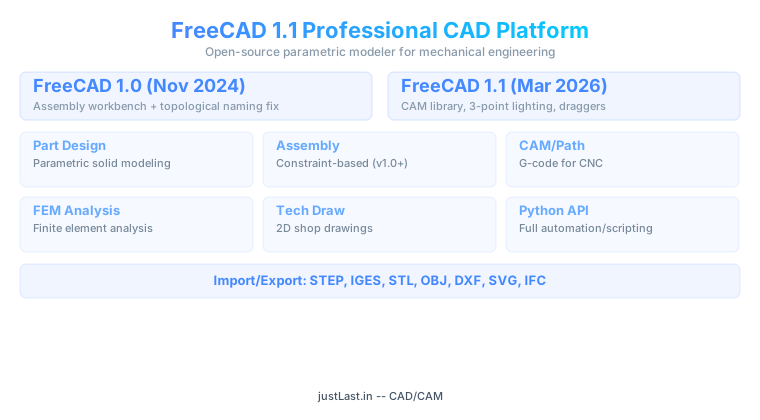
FreeCAD 1.0: The Game-Changer (November 2024)
Version 1.0 introduced a native Assembly workbench with the Ondsel Solver and comprehensive topological naming mitigation.
FreeCAD 1.1: What’s New (March 2026)
New CAM tool library, interactive draggers, 3-point lighting, Clarify Selection tool, transparent previews, Assembly animation improvements, and FEM animation.
Essential Workbenches
Part Design: Parametric solid modeling. Assembly: Multi-part constraints. TechDraw: 2D drawings. Path/CAM: G-code for CNC. FEM: Finite element analysis.
Python Scripting
FreeCAD’s complete Python API enables automation of parametric models, batch exports, and custom workbenches.
File Format Compatibility
STEP, IGES, STL, OBJ, DXF, SVG, IFC, VRML. STEP recommended for professional use.
FAQ
Is FreeCAD free for commercial use?
Yes. LGPL-2.1 license permits commercial use without fees.
Can FreeCAD replace SolidWorks?
For most mechanical design tasks, yes. FreeCAD 1.0+ covers parametric modeling, assemblies, drawings, CAM, and FEM.
Does FreeCAD support CAM/CNC?
Yes. The Path workbench generates G-code for CNC machining.