Key Takeaway: The best CAD/CAM software for CNC machining depends on your budget and workflow. Fusion 360 wins for integrated CAD/CAM value at $680/year, FreeCAD is best for zero-budget Linux users, and SolidWorks remains the enterprise benchmark for large assemblies and formal engineering drawings.
Table of Contents
1. Overview of FreeCAD vs Fusion 360 vs SolidWorks
Choosing the right CAD software for CNC machining is one of the most important decisions you’ll make as a maker or engineer. The wrong choice means wasted time fighting your tools instead of making parts. FreeCAD, Fusion 360, and SolidWorks are three of the most talked-about options, but they serve very different purposes and budgets.
FreeCAD is a completely free, open-source parametric 3D modeler released under LGPL-2.0 license, making it free even for commercial use. Version 1.0, released in late 2024, marked a major stability milestone. It runs on Windows, macOS, and Linux — a rare advantage in the CAD world.
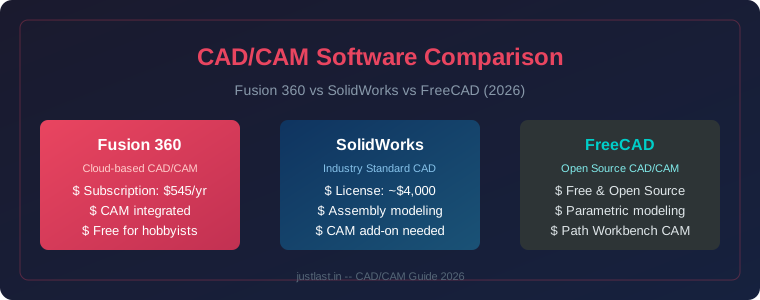
Fusion 360 is Autodesk’s cloud-connected CAD/CAM/CAE platform that integrates design, engineering, and manufacturing in one ecosystem. At approximately $680/year for a commercial subscription, it sits far below SolidWorks pricing while offering surprisingly capable CAM capabilities.
SolidWorks is the industry standard for mechanical design, offering the most robust parametric modeling, assembly management, and engineering drawing tools. However, at roughly $5,500/year for SolidWorks Professional, it’s priced for enterprise use.
2. Pricing and Licensing
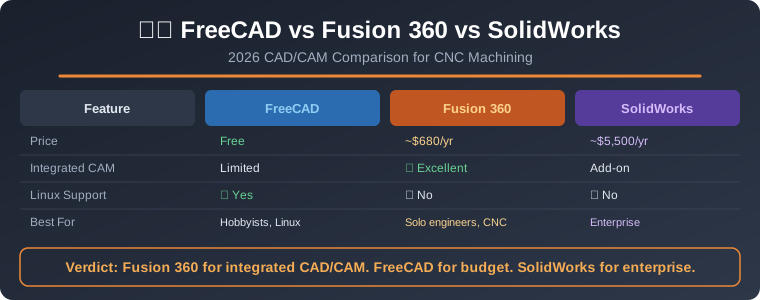
FreeCAD is completely free. Fusion 360 costs $680/year for a commercial subscription, with a free tier available for qualifying non-commercial use that has some limitations on file formats and advanced features. SolidWorks Professional costs approximately $5,500 per year per seat, and add-on CAM packages cost extra.
3. CAM Capabilities for CNC
For CNC users, CAM capabilities may be the deciding factor. Fusion 360 includes integrated high-performance HSM CAM with a massive library of free post-processors. This is its strongest advantage — at $680/year you get CAD plus capable CAM. FreeCAD has CAM modules and plugins, but they are less mature and require more manual setup. SolidWorks requires separate CAM add-ons, adding significant cost.
4. Head-to-Head Feature Comparison
Parametric Modeling: All three handle parametric modeling. SolidWorks is the gold standard with excellent feature tree management. Fusion 360 offers a polished timeline-based workflow. FreeCAD’s Part Design workbench follows a workflow similar to SolidWorks but with a steeper learning curve due to its modular workbench system.
Assembly Management: SolidWorks handles large assemblies (500+ parts) smoothly. Fusion 360 degrades above roughly 200-300 components. FreeCAD struggles with complex assemblies.
Simulation/FEA: Fusion 360 offers good integrated FEA, generative design, and analysis tools. SolidWorks has excellent Simulation capabilities. FreeCAD has basic FEA through its CalculiX workbench.
File Compatibility: All support STEP, IGES, and STL. Fusion 360 has the best cloud-based format translation for working with suppliers. SolidWorks has the best native format support in the industry.
5. Which Should You Choose?
For solo engineers doing their own CNC machining, Fusion 360 is the clear recommendation. The integrated CAM is the deciding factor — no other option in its price range offers this combination.
For hobbyists and Linux users, FreeCAD is a capable choice that keeps growing. Version 1.0 has brought meaningful stability improvements. For enterprise teams handling large assemblies, SolidWorks remains the benchmark.
Frequently Asked Questions
Can FreeCAD and Fusion 360 work together?
Yes, but expect some friction. Export common formats like STEP or STL for geometry exchange. Parametric histories and feature trees won’t transfer, so maintain source files from the native application.
Is Fusion 360 free for hobbyists?
Autodesk offers a free personal use tier for qualifying non-commercial users. It has limitations on file formats, cloud rendering, and CAM features, but it’s a legitimate way to learn the software.
Which is easier to learn: FreeCAD vs Fusion 360?
Fusion 360 is notably easier to learn thanks to its guided workflow, polished UI, and extensive tutorial ecosystem. FreeCAD’s modular workbench approach can feel fragmented but becomes more intuitive with practice.
Related Reading
Sources
- CADGuide.tools — FreeCAD vs Fusion 360 2026 Comparison
- GuidePlaza — FreeCAD vs Fusion 360 Comparison
- GaugeHow — Fusion 360 vs FreeCAD 2026
- Sekkei Tech — FreeCAD vs Fusion 360 vs SolidWorks
- Xometry — FreeCAD vs Fusion 360 Comparison
Disclosure: This post may contain affiliate links. As an Amazon Associate, we earn from qualifying purchases.