SCADA Alarm Management and Rationalisation: Cutting Alarm Floods
Key Takeaway
SCADA alarm management is a capacity problem, not a software problem, because a human operator can absorb roughly one alarm every ten minutes sustained and nothing above about ten alarms a minute. An alarm system that exceeds that capacity provides no protection at all, so the work is rationalisation – one alarm per abnormal condition, every alarm actionable, correctly prioritised – and then disciplined operation with shelving, deadbands and flood detection.
Figure 1: From flood to actionable list – problem, lifecycle, priority, and controls for alarm rationalisation
Figure 1: From flood to actionable list – problem, lifecycle, priority, and controls for alarm rationalisation
1. SCADA Alarm Management and the Alarm Flood Problem
The most common failure in scada alarm management is not that the alarms are wrong. It is that there are too many of them, and the operator has stopped reading them. Everything else in scada alarm management follows from fixing that.
A machine with 60 analog and digital alarms configured, and no rationalisation exercise ever done, will produce on a normal shift perhaps 40 to 100 alarm events. When something genuinely goes wrong, the root cause alarm arrives and is immediately buried under 30 consequential alarms, because the root condition changed the process and the process has 30 other limits around it. The operator sees a list that scrolls for two minutes, does not know which one matters, and eventually acknowledges everything to stop the noise. The system has now recorded an alarm log that says “everything was acknowledged” and tells nobody what went wrong.
This is the trap. An alarm system that floods is strictly worse than no alarm system, because it consumes the operator’s attention, it destroys the credibility of the alarm list, and it produces a false record of attention. The operator’s trust is the asset, and a single flood spends it.
Where the alarms come from
In a machine that was never rationalised, the alarms typically fall into these categories:
Every analog point gets a high and a low alarm. A machine with 24 analog points produces 48 analog alarms before anyone has decided which of them mean anything.
Every drive fault is repeated three ways. The same drive fault appears as a drive trip, a machine stop and a general fault light.
Diagnostics become alarms. A communication loss to a non-critical sensor is an alarm. A failed lamp is an alarm. A warning-level diagnostic is an alarm.
Process values become alarms. A tank level at 40 percent gets an alarm even though 40 percent is normal.
Alarms never expire. An alarm condition that was true once and is now accepted as normal still fires every time it recurs.
None of these are mistakes by a bad programmer. They are what happens when alarms are configured as a by-product of commissioning rather than designed as a system.
2. The ISA-18.2 Lifecycle
ISA-18.2, Management of Alarm Systems for the Process Industries, is the standard that defines the discipline, and IEC 62682 is its international equivalent. EEMUA 191 is the practical companion guideline, and between them they give a clear six-step lifecycle. The order matters, and skipping a step is the single most common cause of a bad alarm system.
Step
What it is
The deliverable
1. Identify
Collect every abnormal condition the process and equipment can produce
An alarm list, with nothing filtered yet
2. Define
Write what each alarm means: the cause, the consequence, the expected action
Alarm descriptions with a stated operator action
3. Rationalise
Decide which alarms deserve to exist, at what priority, and which are just indications
The rationalised alarm list, with the rest removed or demoted
4. Configure
Implement in the DCS, PLC or SCADA with the right priority, deadbands, timers and messages
Use the monitoring data to improve the system on a defined cycle
Change log and a periodic review record
Why rationalisation is the step that gets skipped
Steps 1 and 2 are easy to automate, and step 4 is where the money is, because it is the step that involves configuring the system. So a project goes: identify, define quickly, configure, and ship. Rationalisation is the step that requires people to sit down with the process engineers and the operators and argue about what actually matters, and it is the step that produces the benefit. If you do not have the operator’s time to do rationalisation, you do not have the project, and you should plan a smaller system rather than a larger un-rationalised one.
ISA-18.2 also makes a distinction that matters: an alarm is an indication of an abnormal condition that requires an operator action, while an indication is just a display of a process value. Most bad alarm systems are indications that have been configured as alarms because the configuration was quicker. The rationalisation step is where every indication is examined and the ones that do not require action are demoted to plain indications on the HMI faceplate.
3. The Human Capacity Number
ISA-18.2 states the human capacity limit as a starting point for alarm system design, and it is the number that should drive the whole design. The sustained rate is roughly one alarm per ten minutes per operator. This is not a throughput target to aim for, it is a ceiling. Above it, the operator’s response time starts degrading and the miss rate climbs.
The numbers that follow from the ceiling
One alarm per 10 minutes is 6 alarms per hour, 48 per 8-hour shift, 144 per day across three shifts.
For a machine with 20 actionable alarms, one alarm every 10 minutes means the alarm list is meaningful and the operator can actually hold it in mind.
For a machine with 60 alarms, the sustainable rate implies 10 minutes per alarm, which means the operator spends their entire shift acknowledging alarms and never has time to look at the process.
Peaks above about 10 alarms per minute are unmanageable in the moment, and this is the number that defines a flood.
There is a second limit worth knowing: the operator also needs time to process an alarm, not just acknowledge it. Reading the message, understanding the condition, deciding on the action and doing it takes 1 to 5 minutes depending on how familiar the operator is. The ten-minute figure already assumes a trained operator on a known process, so a new operator, a night shift with a lower staffing level, or a machine with an unfamiliar process will exceed the practical limit at a lower alarm rate. Design for the night shift, not for the best operator on the best day.
Standing alarms and their effect
A standing alarm is one that is active for more than a specified period, commonly 24 hours, without being cleared. A standing alarm is a permanent distraction and it also signals that the process has an abnormal condition the operator has learned to ignore. The standard guidance is that standing alarms should be a small number, ideally below 5 percent of the total alarm population, and that every standing alarm must be an explicit exception with an owner and a resolution date.
The chattering alarm
A chattering alarm crosses its alarm limit repeatedly, typically several times a minute. It is the fastest way to destroy an operator’s trust in a specific alarm, and it usually appears in a hurry when a value is hovering around the limit with noise on it. Chatter must be engineered out, not acknowledged out. The three tools are deadband, on-delay timer and hysteresis, and they are covered in section 6.
4. Rationalisation Rules and How to Apply Them
Rationalisation is a filter with five tests. An alarm that passes all five stays. An alarm that fails any one is demoted to an indication, deleted, or moved to a diagnostic channel that the operator does not have to watch.
Test 1: one alarm per abnormal condition
If one root cause produces five alarms, keep one and remove four. A drive trip that also stops the machine, lights a stack light and generates a general machine fault is three alarms for one condition. Rationalise it to one alarm at the right priority, and let the machine stop and the stack light be consequences of the alarm state, not separate alarms. This single rule typically removes 30 to 40 percent of the alarms in an un-rationalised system.
Test 2: every alarm must be actionable
Ask: what does the operator physically do about this? If the answer is “look at it”, “monitor it” or “note it”, it is not an alarm. If the answer is a specific physical action, it is an alarm. “Note it” is a classic form of a disguised indication, and it is where the dead weight usually lives.
Test 3: specific enough to act on
The alarm message must state the condition, the probable cause and the action. “ALARM 1043” tells the operator nothing. “LUBE PRESSURE LOW – CHECK PUMP AND OIL LEVEL” tells the operator what to do. The message test is where rationalisation has the biggest practical payoff, because a generic message forces the operator to go and find the documentation, and during a flood there is no time for that.
Test 4: correct priority
ISA-18.2 uses a priority scheme based on urgency and consequence. The common mapping used in practice is:
Priority
Meaning
Response
Critical
Imminent loss of the process or a safety hazard, requires immediate action
Immediate, loud, acknowledged and acted on at once
High
Serious deviation that will become critical if not acted on within minutes
Prompt action, within a few minutes
Medium
Deviation that needs attention but is not time critical
Action within the shift
Low
Indicates a developing problem
Review at the next routine opportunity
Journal only
Recorded for trend and diagnostics, no operator notification
Reviewed later, often by the engineering team
The most common rationalisation error is priority inflation. If 40 percent of the alarms are critical, then critical means nothing, and the operator treats a critical alarm the same way as a low one. A working target for a machine-level system is roughly 5 to 10 percent critical, 15 to 20 percent high, 30 to 40 percent medium, the rest low and journal. Getting the distribution right is worth more than any individual alarm’s message.
Test 5: distinct from the normal operating indication
If a value is displayed on the HMI with a bar graph and a numeric reading, then an alarm on that value is only justified when it crosses a threshold that the operator cannot reasonably watch for continuously. If the operator must watch a tank level at all times, an alarm on it at 20 percent is noise. This test removes a large number of low-value analog alarms, and it is the test most often skipped because it requires somebody who knows how the operator actually watches the screen.
Consequence analysis
The method that makes rationalisation defensible is consequence analysis. For each candidate alarm, work out: what is the worst outcome if it is not acted on, how quickly, how likely, and what happens to the process. A tank level high alarm with an overflow to a bund is a high-priority alarm. A tank level high alarm with 500 mm of freeboard and a 30-minute operator response time is a low-priority alarm, or an indication. The point is not to get the priority right the first time. The point is to have a documented reason for it, so that when the alarm floods at 3 am, somebody can go back and see why it was set the way it was.
5. State-Based and Deviation Alarming
There are two fundamentally different ways to generate an alarm, and choosing the wrong one is a common cause of both floods and missed alarms.
Deviation alarming
Deviation alarming fires when a measured value crosses a fixed limit, regardless of what the process is doing. It is simple to configure and it is what most alarm systems are built on. Its weakness is that the limit is a compromise: it must be wide enough to avoid nuisance alarms during normal variation, and that width creates a blind band where the process is abnormal but no alarm fires.
State-based alarming
State-based alarming fires when the process is not in the state it should be in for the current operating mode. A tank has a high level alarm when it is being filled and a low level alarm when it is being emptied, and the same sensor generates different alarms depending on what the machine is doing. The alarm is raised because the state is wrong, not because a number crossed a threshold.
State-based alarming is harder to configure and considerably more useful on a machine with modes, because it eliminates the alarms that only occur in an unusual operating state. It also handles the start-up case naturally, since the state machine knows it is starting.
Practical guidance
Use deviation alarming for continuous process variables with a genuine safety or quality limit: temperature, pressure, speed, level.
Use state-based alarming for machine sequence conditions: part clamped, guard closed, conveyor clear, cycle complete, door open.
Use a combination on machines with modes, where the same level sensor is meaningful in filling and not in emptying.
Never alarm on a value whose limit is derived from another value that is itself alarmable, without checking the interaction. A cascade of derived limits is where un-rationalised systems produce their worst floods.
6. Chatter, Deadbands, Timers and On-Delay
Chatter is the enemy of trust. Every fix here is a configuration setting, and every one of them is skipped in an un-rationalised system.
Deadband
A deadband is a margin around the alarm limit inside which the value can move without the alarm state changing. Without a deadband, a value sitting at 100.0 deg C against a 100 deg C limit will oscillate between alarm and normal every time the measurement noise moves it by 0.1 deg C.
Sizing rule: the deadband should be at least 2 to 3 times the measurement noise. For a thermocouple with 0.5 deg C noise and a 0.5 percent FS transmitter with a 400 deg C span, the noise is about 2 deg C, so the deadband is 6 deg C. A sensible starting point for a process limit is 2 to 5 percent of the alarm span, and it should be reviewed against the measured data in the monitoring phase.
On-delay timer
An on-delay timer requires the condition to be true continuously for a set time before the alarm activates. This is the correct tool for a transient condition. A level switch that dips for 200 ms because a part bounced does not need an alarm. A 3-second on-delay eliminates that entirely without hiding a genuine sustained deviation.
Sizing rule: the on-delay must be shorter than the time it takes for the process to reach a damaging condition. If a bearing reaches damage temperature in 30 seconds, an on-delay of 10 seconds leaves 20 seconds of margin. The on-delay and the deadband are complementary: the deadband handles noise around a steady value, the on-delay handles short transients.
Off-delay and hysteresis
Sometimes the problem is the opposite: the alarm clears too quickly and the operator sees it flicker on and off. An off-delay or a return-to-normal hysteresis keeps the alarm latched for a set time after the condition clears, so the operator sees one clean event rather than five.
Startup suppression
Every machine produces a burst of alarms during start-up and during a controlled stop, because every value is off its normal operating point. A typical machine start-up produces 5 to 20 alarm events. Over three shifts a day that is 60 events a day of pure noise, and it teaches the operator to dismiss alarms without reading them.
The fix is a suppression window. During the start-up transient, alarms are suppressed or marked as startup-related, and only the alarms that matter during start-up (the ones that indicate a genuine failure to start) remain active. This is usually implemented with a machine running flag in the PLC: when the machine is not in the RUN state, the alarm group for process limits is not evaluated, and the alarm group for start-up failures is.
The same applies to shutdown. Suppress the process alarms during the stop sequence, and keep the alarms that indicate a failure to stop.
Chatter detection
Most modern SCADA and DCS platforms can count how many times an alarm has gone active and returned to normal in a period, and flag any alarm that crosses more than a set number of times, commonly 3 to 5 times in 15 minutes, as a chattering alarm. If the platform does not have it, it can be done in the PLC or in the SCADA script layer. A chattering alarm is a defect in the configuration and it must be fixed at the source with a deadband or an on-delay. Acknowledging it repeatedly is not a fix.
7. Shelving, Out of Service and Flood Detection
These three mechanisms are what keep the alarm system working between the rationalisation exercises, and every one of them needs a documented process, otherwise they become a way of hiding alarms permanently.
Alarm shelving
Shelving temporarily removes an alarm from the operator’s active list while a known problem is being worked on. A drive that is waiting for a replacement part should be shelved so it does not alarm all shift.
Two rules make shelving safe:
A reason is mandatory. The operator selects a reason from a fixed list, such as “maintenance in progress”, “awaiting spare part” or “bypassed for test”. A free-text reason is acceptable as a supplement but never as a substitute, because a free-text reason is never filled in and always says the same thing.
An expiry is mandatory. The shelf has a time limit, typically 8 hours or one shift, and it auto-releases at expiry. A shelf with no expiry becomes a permanent silent alarm and it is the most common way alarm systems rot.
Out-of-service banners
A shelved alarm does not disappear, it is moved to a shelved list that is visible to the supervisor and to the shift handover. The HMI should show a persistent banner stating how many alarms are currently shelved and when they expire. This is the single most important HMI feature for keeping an alarm system honest, because it makes the shelving visible to the people who have not shelved them.
Flood detection
Flood detection is a system-level function that watches the alarm rate across the plant or the line and raises a distinct, high-priority alarm when the rate exceeds a threshold, commonly more than 10 alarms in 5 minutes or more than 3 alarms per minute sustained. The flood alarm must not be in the same list as the alarms that are flooding, because the list is unusable at that moment. It should be a separate, hard, banner-level alarm that says “ALARM FLOOD – SEE ALARM SUMMARY” and points the operator at the summary counts.
The standing alarm list
Every shift, the alarms that remained active from the previous shift are reviewed by name. A standing alarm is either cleared, or formally accepted with an owner and a date. This routine is what keeps the active alarm count from creeping upward over a year, and it is the cheapest and most effective alarm system maintenance there is.
8. Alarm Handling in the SCADA and HMI
The alarm system is the interface between the rationalised list and the human. A perfectly rationalised list presented badly is still a flood.
What the alarm list must show
The list is the interface between the rationalised set and the human, so how it is presented decides how much of the rationalisation effort actually reaches the operator.
The unacknowledged count at the top, always visible from every screen, including the main process overview. This is the number that tells the operator whether they are in trouble.
The alarm list itself with time, tag, description, priority and acknowledgement state, and with the highest priority at the top, not the most recent at the top. Newest-first ordering is what causes the root cause to scroll away, which is the central failure mode of a flood.
The alarm summary by priority, as counts. Counts of unacknowledged critical, high, medium and low.
The first-out alarm. The first alarm in the sequence, which is usually the closest thing to the root cause. ISA-18.2 recommends the first-out indication be displayed with the alarm list, because during a flood it is the only item that is likely to be the cause.
The standing alarm list and the shelved alarm list, both with counts and expiry dates.
The flood banner when active.
Alarm history and the audit trail
Every alarm event, acknowledgement, reset, shelving and unshelving must be recorded with a timestamp and the identity of the person. This record is used in the monitoring phase of the lifecycle, and it is also the only way to answer the question that gets asked after every serious breakdown, which is who was looking and when. On a shop floor with three shifts and mixed operator experience, the alarm history is how you find out whether the alarm system was working or whether the operators had already stopped trusting it.
Do not hide the summary
The most damaging HMI design mistake is making the operator dismiss a summary banner to reach the process screen. Any design that puts the alarm summary behind a menu, or that lets the operator navigate away from the process overview while critical alarms are unacknowledged, guarantees that alarms get missed. The summary and the list stay on the main screen.
Sound and annunciation
Use distinct sounds for critical, high and medium, and make the critical sound impossible to ignore without being unbearable. A single sound for everything means the operator treats every sound as low priority. Also provide a visual annunciation that persists until acknowledged, because in a noisy shop the sound is often missed entirely and the operator’s hearing protection makes it worse.
9. Worked Example: 60 Alarms Down to 18
Take a typical 3-shift machine, a conveyor line with a 15 kW drive, a PLC, 24 analog points and a hydraulic power unit. After a year of operation the SCADA shows 60 configured alarms and the operator reports that the alarm screen is useless. Here is the rationalisation walk-through.
Step 1: identify
Collect everything: the 60 configured alarms plus the 14 conditions that are currently only indications. Total 74 candidate alarms.
Step 2: define
Write a one-line definition for each: the condition, the cause, the operator action. Fourteen of the 74 have no operator action defined, which is an immediate red flag: they are indications that were configured as alarms.
Step 3: rationalise
Category
Count
Action
Result
Duplicates of one condition
17
Keep the root-cause alarm, demote the rest to indications driven by the alarm state
Removed
No operator action defined
14
Demote to indication on the HMI faceplate
Removed
Normal operating value with a limit
12
Demote to indication, or set the limit at the genuinely abnormal level
Removed
Diagnostics, warnings and non-critical comms faults
7
Move to the journal channel, no operator notification
Moved
Process deviations genuinely worth an alarm
18
Keep, with correct priority, deadband and on-delay
Kept
Machine sequence states
6
Keep, as state-based alarming
Kept
Result: 74 candidates become 18 operator-facing alarms plus 6 state-based sequence alarms, so 24 in the operator’s list, with the rest either demoted to indications on the faceplate, moved to the journal channel, or removed entirely because the underlying condition is now covered by a retained alarm.
Step 4: set the priorities
Priority
Count
Examples
Critical
2
Hydraulic pressure loss with the press running; emergency stop actuated
High
4
Drive fault on the main conveyor; low air pressure; guard open while running
Medium
8
Bearing temperature high; level high; motor overload warning
Two critical alarms out of 24 is 8 percent, which is inside the working target. The system now means something.
Step 5: configure
Add a deadband of 2 to 5 percent of span on every analog alarm, and a 3-second on-delay on every transient-prone alarm.
Rewrite every message in the state, cause and action form. Example: “HYD PRESS LOW – CHECK PUMP RELAY P3 AND OIL LEVEL”, not “PRESS SW FAIL”.
Implement the startup suppression window using the machine RUN flag, and the shutdown window in the same way.
Set the alarm list to sort by priority, then by time.
Turn on the chatter counter and the flood detector with a threshold of 3 alarms per minute sustained.
Step 6: monitor and review
After 30 days of production, review the statistics: total alarm events per shift, the top 10 alarms by frequency, the standing alarm count, the chattering alarms, and the mean time to acknowledge. The target is a sustained rate under 1 alarm per 10 minutes per operator, which for 24 alarms means roughly 15 to 25 alarm events per shift across the whole line. If the count is still far above that, the remaining alarms are too sensitive and need their deadbands or on-delays increased, and the review repeats in 60 days.
10. Indian Shop Floor Context
The standard assumes a trained operator and a plant with a formal alarm system. Most Indian manufacturing plants have neither, and the design has to adapt rather than the operators having to adapt.
Operators with limited formal training
A large proportion of shop-floor operators in Indian SMEs have electrical or mechanical diplomas rather than instrumentation or process backgrounds, and many have been trained on the machine rather than on the control system. Two consequences follow. First, the alarm message must be written in plain language with the action in the message, because the operator cannot be expected to look up a code. Second, the rationalisation must be done with the actual operators present, not with only the engineers, because the engineers know the process and the operators know what the machine really does.
Multi-operator shifts
A plant running three shifts with two operators per shift and a handover of 15 minutes has a specific alarm problem at handover: alarms raised in the last minutes of a shift are often reset rather than handed over. The fix is procedural rather than technical. Include the unacknowledged alarm list and the standing alarm list in the shift handover sheet, make resetting an alarm without an action a documented exception, and keep the alarm history in the SCADA so that the handover can be checked later.
Machines running three shifts
A machine that runs 24 hours a day accumulates alarm events continuously, and the 8-hour-shift view of the data hides the problem. Rationalisation reviews must be done on a week of data rather than a shift of data. A machine that produces 60 alarms per shift produces 720 alarms per week, and any alarm that fires more than a few times a week is a configuration defect rather than a process event.
No dedicated alarm analyst
There is no such role in most Indian plants, so the monitoring and review steps of the lifecycle have to be assigned to somebody who already has a full-time job. The practical approach is to automate the monitoring step and make the review cheap:
Have the SCADA publish a daily alarm report by email to the maintenance manager, listing the top alarms by frequency, the standing alarms, the chattering alarms and the mean acknowledge time. This is a 20-minute configuration job and it removes the need for anyone to remember to check.
Make the total alarm count per shift a number that is visible in the plant. When it goes up, something changed. Most plants track output and downtime; the alarm count belongs on the same dashboard.
Set the review cycle to quarterly, on a fixed date, with the operator and the maintenance engineer in the room for 45 minutes. Quarterly is realistic for a plant with no analyst, and it is enough to catch the drift.
Language and the working environment
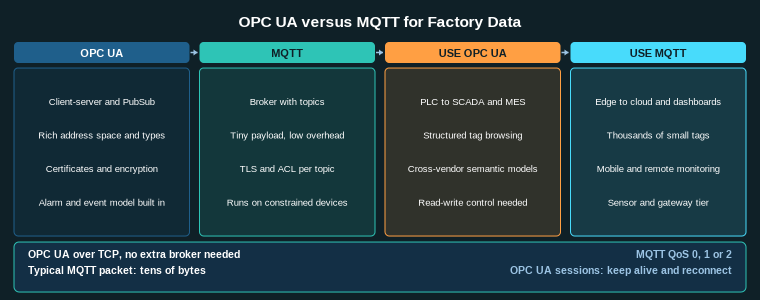
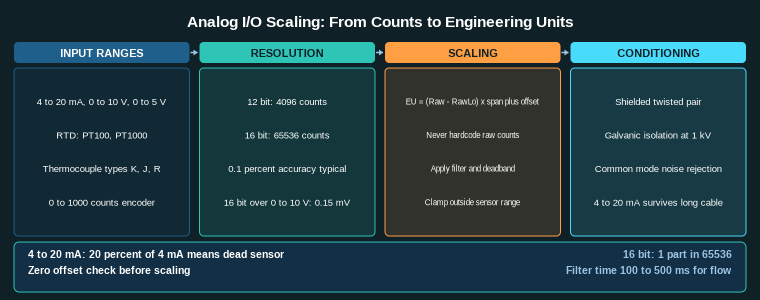
Write the alarm messages in the language the operator actually reads. For most Indian plants that is the local language for the shop floor and English for the engineering record, and a bilingual alarm message is entirely normal. The consequence for rationalisation is real: an English-only message on a bilingual panel will be misread by the operator who has to act on it, and a misread alarm wastes exactly the attention the rationalisation was meant to protect. The signal conditioning that produces the underlying values, and the noise that drives chatter, is covered in the analogue I/O scaling guide, and the data path that carries the alarm events is covered in the OPC UA versus MQTT guide.
SCADA alarm management is a human capacity problem. Roughly one alarm per ten minutes per operator is the sustainable rate, and peaks above about ten alarms per minute are unmanageable.
ISA-18.2 defines a six-step lifecycle – identify, define, rationalise, configure, monitor, review – and the rationalisation step is where most projects skip straight to configuration and end up with 60 alarms on a machine that needs 18.
One alarm per abnormal condition, every alarm actionable, every alarm specific enough to act on, every alarm correctly prioritised and distinct from the normal operating indication.
A flood is worse than no alarm, because the root cause is buried under forty consequential alarms and the operator stops trusting the list.
Shelving needs a reason and an expiry, deadbands and on-delay timers kill chatter, and startup suppression plus flood detection protect the first ten minutes of every shift.