Key Takeaway: The ESP32-C6 puts Wi-Fi 6 and Zigbee/Thread (802.15.4) on a single RISC-V chip, so one board can do cloud Wi-Fi and local Matter mesh without a second radio or coordinator.
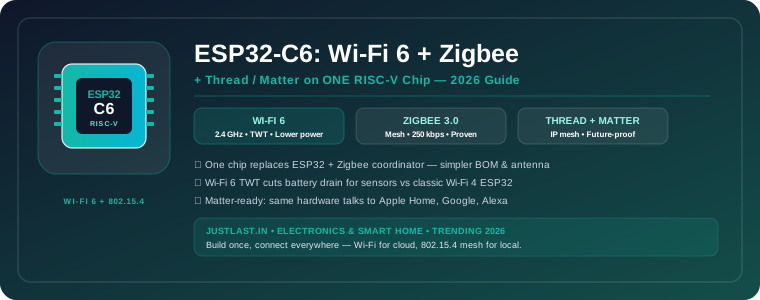
Table of Contents
- 1. Why the ESP32-C6 Is Trending Right Now
- 2. What the C6 Actually Is (and Is Not)
- 3. Wi-Fi 6 on a $3 MCU — What TWT Really Buys You
- 4. Zigbee 3.0 vs Thread vs Matter — Pick Your Mesh
- 5. Real Projects: Gateway, Sensor Node, and Matter Bridge
- 6. C6 vs C3 vs S3 vs Classic ESP32 — When to Use Which
- 7. Getting Started: Toolchain, SDK, and First Build
- 8. FAQ
- 9. Related Reading
- 10. Sources
1. Why the ESP32-C6 Is Trending Right Now
If you searched for an ESP32 board in 2024 you got Wi-Fi 4 and Bluetooth. If you search in August 2026, the answer that keeps surfacing is the ESP32-C6 — Espressif’s first chip to pair Wi-Fi 6 (802.11ax) on 2.4 GHz with an 802.15.4 radio for Zigbee 3.0 and Thread on one RISC-V die. The hype is not just spec-sheet theater: Matter certification is now a hard requirement for smart-home products selling into Apple Home, Google Home, and Alexa, and the C6 is the cheapest path to a single-SKU Matter device. Distributors that were allocation-constrained in 2024–2025 now stock C6 modules (ESP32-C6-WROOM-1, C6-MINI) at near-C3 prices, and Espressif’s Arduino and ESP-IDF support has moved from beta to stable over the last two quarters.
For industrial and workshop builders this matters because the ESP32-C6 Wi-Fi 6 Zigbee Thread Matter combination collapses two radios and a coordinator into one BOM line — fewer antennas, one firmware image, one certification. That is why you see C6 popping up in gateway designs, sensor nodes, and retrofit controllers that previously needed an ESP32 plus a separate CC2652 or EFR32 for Zigbee. If you are planning a new smart-home or light-industrial mesh product in 2026, designing around the C6 now is cheaper than redesigning around it six months from now.
2. What the C6 Actually Is (and Is Not)
At its core the ESP32-C6 is a single-core RISC-V (RV32IMAC) at 160 MHz with 512 KB SRAM and 320 KB ROM, plus the radios. Compared to the Xtensa-based classic ESP32 and ESP32-S3, you give up the second core and a chunk of RAM, but you gain the 802.15.4 radio, Wi-Fi 6 target wake time (TWT), and lower deep-sleep current. Flash is external (typically 4–8 MB on modules), and there is no classic Bluetooth — you get Bluetooth 5 LE only.
Key specs that drive buying decisions: Wi-Fi 6 on 2.4 GHz (802.11ax, 20 MHz, TWT, OFDMA downlink), 802.15.4 for Zigbee 3.0 and Thread 1.3, Bluetooth LE 5.3, 30 GPIOs on the WROOM-1 (with strapping pins to respect), USB-Serial-JTAG, and the usual Espressif peripherals (SPI, I2C, UART, ADC, PWM, RMT). Power: modem-sleep and light-sleep benefit significantly from TWT, with data-sheet deep-sleep at ~7 µA (RTC memory retained). Price: C6 modules have settled to roughly $2.80–$4.20 in volume, within striking distance of the C3, which is why new designs are migrating.
What it is not: it is not a drop-in for compute-heavy tasks. If you need dual-core, large PSRAM, or camera/USB-OTG, the S3 remains the right pick. And like all 2.4 GHz-only parts, it will not help in 5 GHz-congested environments — but for IoT sensors and actuators that distinction rarely matters. For a broader gateway comparison, see our industrial IoT gateway comparison (Pi vs ESP32 vs STM32).
3. Wi-Fi 6 on a $3 MCU — What TWT Really Buys You
Wi-Fi 6 on an MCU is easy to dismiss as a checkbox until you measure battery life. The headline feature for IoT is Target Wake Time: the access point and station negotiate a wake schedule so the radio sleeps between beacons instead of waking every 100 ms to poll. On a sensor that reports once per minute, TWT can cut average Wi-Fi current by 30–50% versus Wi-Fi 4 power save, which translates directly to smaller batteries or longer intervals between charges.
Practically, TWT needs a Wi-Fi 6 access point that actually honors it — most 2025–2026 home routers do, but enterprise APs vary by firmware. Espressif’s ESP-IDF exposes TWT setup in the Wi-Fi driver; in the default configuration you enable it and let the AP negotiate. Throughput gains from OFDMA matter less for IoT (you are sending kilobytes, not streaming video), but better coexistence in dense apartments and workshops does matter — Wi-Fi 6’s BSS coloring and spatial reuse reduce retries when dozens of APs overlap, which is the norm in Indian apartment blocks and factory floors.
If your device already needs Wi-Fi for cloud uplink, the C6 lets you stay on Wi-Fi with lower power while also running a local mesh — no second power domain, no UART bridge between two MCUs. That simplification is where the real cost saving lives. For deeper networking context, our STM32 + ESP32 gateway build shows the older two-chip pattern the C6 now replaces in many cases.
4. Zigbee 3.0 vs Thread vs Matter — Pick Your Mesh
The C6’s 802.15.4 radio can run Zigbee 3.0 or Thread — not both at the same instant on the same radio, but you choose per firmware. Zigbee is the proven mesh for commercial lighting, sensing, and building automation: mature stacks, wide device compatibility, and coordinator/router/end-device roles you can tune for each node. Thread is the IP-native mesh that Matter rides on: every Thread node gets an IPv6 address, border routers bridge to Wi-Fi/Ethernet, and commissioning uses standard IP flows rather than Zigbee’s profile clusters.
Matter is the application layer above Thread (and Wi-Fi) that finally delivers cross-ecosystem pairing — one Matter-certified accessory can be commissioned into Apple Home, Google Home, Samsung SmartThings, and Alexa without per-platform firmware. For a new product, building as a Matter-over-Thread accessory on the C6 is the most future-proof path; for a retrofit into an existing Zigbee deployment, run the C6 as a Zigbee coordinator or router. Espressif ships both Zigbee SDK (ESP Zigbee SDK) and OpenThread + Matter (ESP Matter SDK) for the C6, and you can prototype both from the same devkit by flashing different firmware.
Range and rate are similar — 802.15.4 at 250 kbps, mesh hops extend range beyond a single link. Antenna design dominates real-world range more than the stack: keep the module’s keep-out area clear, avoid ground pour under the antenna, and follow the module data sheet for enclosure clearance.
5. Real Projects: Gateway, Sensor Node, and Matter Bridge
Project A — C6 as Zigbee-to-MQTT gateway: One C6-WROOM-1 as Zigbee coordinator plus Wi-Fi uplink to your MQTT broker replaces the classic ESP32 + CC2652 gateway. Flash the ESP Zigbee coordinator example, pair 20–50 Zigbee sensors, and bridge their reports to MQTT topics. One antenna to tune, one OTA image to manage.
Project B — Battery sensor node: A C6-MINI with a BME280 and a 1000 mAh Li-ion cell, reporting temperature/humidity every 5 minutes over Thread to a border router (another C6 or an off-the-shelf Thread border router). With TWT and deep sleep between reports, multi-month battery life is realistic without exotic power tricks.
Project C — Matter bridge for legacy Modbus gear: A C6 running Matter bridge firmware that exposes legacy RS-485 sensors as virtual Matter devices. Your existing STM32/Arduino sensor network stays, but Apple Home and Google Home see Matter accessories. This is the fastest path to “works with everything” for small industrial monitors and workshop automation.
Parts for all three are commodity: ESP32-C6 devkits on Amazon India, Zigbee sensors, and standard 802.15.4 antennas. Budget ₹1,200–₹2,500 per node in low volume.
6. C6 vs C3 vs S3 vs Classic ESP32 — When to Use Which
Choose the C6 when you need any combination of Wi-Fi cloud plus 802.15.4 mesh (Zigbee/Thread/Matter) on one chip, care about Wi-Fi 6 power savings, or want Matter certification with minimum hardware. Choose the C3 when cost is paramount and you only need Wi-Fi 4 + BLE with the smallest footprint — it remains the cheapest Espressif option. Choose the S3 when you need horsepower: dual-core, up to 512 KB SRAM plus PSRAM, camera support, USB-OTG, or AI/tinyML workloads. Keep the classic ESP32 only for designs that depend on its dual-core Xtensa or existing certification — for new work, C6 or S3 dominates.
Migration note: the C6 is RISC-V, so any Xtensa assembly or Xtensa-specific SDK tricks need porting, but standard ESP-IDF and Arduino abstractions carry over cleanly. Most Arduino libraries just work once you select the C6 board. Check one peripheral at a time — RMT, MCPWM, and USB behavior differ slightly across families. Our smart door lock roundup is a good example of product thinking that benefits from Matter — a C6-based lock can satisfy multiple ecosystems with one radio.
7. Getting Started: Toolchain, SDK, and First Build
ESP-IDF path (recommended for production): Install ESP-IDF 5.2+ (C6 support is stable from 5.1 onward, but 5.2+ fixes TWT edge cases), run idf.py set-target esp32c6, build the wifi/iperf and zigbee/light_switch examples to verify both radios, then layer in ESP Matter for a Matter accessory. OTA and NVS are the same story as other ESP32 parts.
Arduino path (fastest to blink): In Arduino IDE 2.x add the Espressif board package (3.0+), select “ESP32C6 Dev Module,” and run the WiFiScan and Zigbee examples. Arduino hides the 802.15.4 complexity behind libraries but exposes less of the Thread/Matter stack — fine for learning, but ship Matter products from ESP-IDF + ESP Matter.
Buying advice: Start with a DevKitC-1 (C6) or any C6-WROOM-1 breakout. Confirm your module’s antenna variant (PCB vs external) matches your enclosure — metal boxes need an external antenna. And keep one spare — at this price, a dead board should never block a day of development.
Frequently Asked Questions
Does the ESP32-C6 have classic Bluetooth?
No. The C6 has Bluetooth LE 5.3 only, plus Wi-Fi 6 and 802.15.4 for Zigbee/Thread. If you need Bluetooth Classic (A2DP, SPP), use the S3 or classic ESP32 instead.
Can the ESP32-C6 run Zigbee and Thread at the same time?
Not simultaneously on the single 802.15.4 radio. You flash either Zigbee or Thread/Matter firmware per device. A gateway design typically runs Zigbee or Thread on the C6 and bridges to Wi-Fi/MQTT or Matter on the same chip.
Is the ESP32-C6 good for battery-powered sensors?
Yes — that is one of its strongest cases. Wi-Fi 6 TWT lowers average Wi-Fi current versus Wi-Fi 4, and the 802.15.4 mesh lets you use Thread with very low duty cycles. Combined with deep sleep, multi-month life on a small Li-ion cell is achievable for infrequent reporting.
Should I choose ESP32-C6 or ESP32-C3 for a new design in 2026?
Choose C6 if you need Zigbee, Thread, Matter, or Wi-Fi 6 power savings — the price gap to the C3 has narrowed enough that future-proofing is cheap. Stick with C3 only for the absolute lowest BOM where you are certain you will never need 802.15.4.
Do I need a Thread border router for Matter over Thread?
Yes — Thread devices need a Thread border router to bridge to your Wi-Fi/Ethernet LAN. That can be another C6, an Apple TV / HomePod mini, a Google Nest Hub, or a dedicated border-router appliance. Matter over Wi-Fi on the C6 does not need one.
Related Reading
- Industrial IoT Gateways Compared: Raspberry Pi, ESP32, STM32 and Industrial PCs
- STM32 + ESP32 Industrial IoT Gateway: Build a Reliable Edge-to-Cloud Bridge
- Build a Low-Cost OpenPnP SMT Assembly Line: From Reels to Placed Boards
Sources
- Espressif — ESP32-C6 Product Page and Data Sheet
- Espressif ESP-IDF — ESP32-C6 Programming Guide
- Connectivity Standards Alliance — Matter Specification
- OpenThread — Thread Networking Stack
Disclosure: This post contains affiliate links. If you purchase through these links, we may earn a small commission at no extra cost to you.