Key Takeaway: A CNC router is the right choice for wood, acrylic, and soft materials at high speed and low cost, while a CNC mill is built for precision metal cutting with rigid frames and higher accuracy — so the correct pick depends entirely on the materials you machine and the tolerances you must hold.
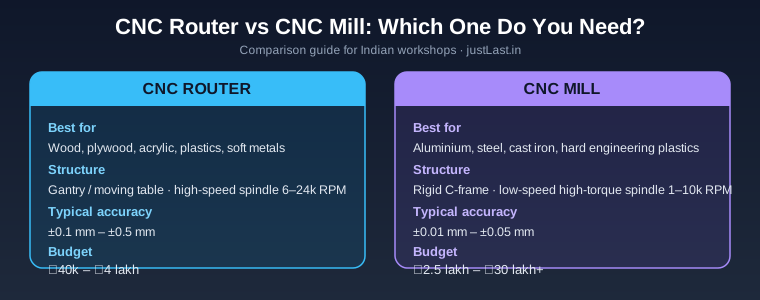
Table of Contents
1. CNC Router vs CNC Mill: The Core Difference
Every workshop owner who steps into CNC eventually asks the same question: cnc router vs cnc mill — which machine should I buy? On the surface both look similar: a moving spindle, a work table, stepper or servo motors, and G-code driving the whole thing. But they are engineered for completely different jobs, and picking the wrong one wastes lakhs of rupees.
A CNC router is a high-speed, low-torque machine with a light gantry frame. It is designed to remove soft material quickly — wood, plywood, MDF, acrylic, PVC, and occasionally aluminium at very light depths. A CNC mill is a rigid, low-speed, high-torque machine built around a heavy C-frame or box-way column. It is designed to cut steel, stainless steel, cast iron, and aluminium to tight tolerances while producing a surface finish that often needs no secondary machining.
The practical way to remember the split: routers move fast but cut soft, mills move slow but cut hard. You cannot retrofit a router into a mill and you cannot make a mill run like a router. The two machines sit on different ends of the stiffness-to-speed spectrum, and your choice must match the work you actually do.
2. Materials Each Machine Handles Best
Material is the single biggest deciding factor in the cnc router vs cnc mill debate. A router with a 2.2 kW water-cooled spindle will happily face-cut a 19 mm plywood sheet at 12,000 RPM all day. Try the same on a block of mild steel and you will instantly stall the spindle and likely break the end mill. Conversely, a mill running a 4-flute carbide cutter at 800 RPM can plough through steel, but it would be painfully slow and overkill for engraving nameplates.
CNC routers are best for:
- Wood, plywood, MDF, and hardboard (furniture, signage, doors)
- Acrylic, polycarbonate, PVC, HDPE, and engineering plastics
- Aluminium sheet and plate at light depths with proper feeds and speeds
- Foam, wax, and composite materials for prototyping and moulds
- Sign-making, engraving, PCB isolation routing, and 3D carving
CNC mills are best for:
- Mild steel, alloy steel, stainless steel, and cast iron
- Aluminium and brass parts that need tight tolerances
- Production machining of brackets, shafts, gears, and die components
- Hardened materials and any job that requires flood coolant
- Second-operation work where surface finish and repeatability matter
If more than 20% of your work is metal, the calculation changes completely. A router that occasionally cuts aluminium is fine for a hobbyist; a workshop quoting metal jobs needs a mill, period. This is also the main reason an existing GRBL-based router setup — which we have covered in our GRBL CNC setup guide — stays limited to wood and plastic.
3. Accuracy, Rigidity, and Surface Finish
Rigidity is everything in CNC. The frame of the machine determines how much of the cutting force is absorbed before it reaches the tool. A gantry router made of extruded aluminium or steel profiles flexes under load; a mill with a cast-iron column and dovetail or linear ways barely moves at all. That stiffness difference translates directly into accuracy.
A typical hobby router holds ±0.1 mm to ±0.5 mm, which is plenty for signboards and cabinet parts. A benchtop mill holds ±0.01 mm to ±0.05 mm, and a proper VMC (vertical machining centre) can do much better. When you are cutting mating parts, bearing housings, or threaded holes, that 10× gap in accuracy is the difference between a part that assembles and a part that gets scrapped.
Surface finish follows the same logic. A rigid mill takes uniform chip loads, so the machined face is smooth and consistent. A flexing router leaves witness marks, chatter, and scalloping, especially in harder materials. This is why CNC machining time reduction strategies — which we covered in an earlier guide — rely on machine rigidity as much as on CAM strategy.
4. Spindle Speed and Torque Explained
The spindle is the personality of each machine. CNC routers use high-speed spindles from 6,000 to 24,000 RPM with relatively low torque. High RPM is exactly what cutting wood and plastic needs, because the cutting speed (surface metres per minute) has to be high even with a small-diameter cutter. A 6 mm end mill in plywood wants to spin fast; at 12,000 RPM you get clean shearing instead of burning.
CNC mills use spindles from around 800 to 10,000 RPM with much higher torque at the low end. Cutting steel requires slow surface speed but aggressive chip load per tooth, which is a torque demand. The motor that powers a mill spindle is also more robust — often a 1.5 kW to 7.5 kW VFD-driven motor — precisely because metal cutting loads the spindle far harder than wood ever will.
A common mistake is judging a machine by “maximum RPM”. A router advertising 24,000 RPM looks impressive, but at 1,500 RPM it has almost no usable torque. A mill’s 10,000 RPM may look modest, yet it will produce far more cutting force at 2,000 RPM than the router does at 2,000 RPM. When comparing machines, compare torque curves, not peak RPM. This is the same logic behind the stepper vs servo motor choice for CNC — the drive system must match the cutting load.
5. Cost Comparison for Indian Buyers
Price is where the cnc router vs cnc mill decision often gets decided for small workshops. Entry-level desktop routers start around ₹40,000 to ₹60,000 in India. A 6040 or 6090 frame with a 1.5 kW spindle and a GRBL controller lands between ₹80,000 and ₹1.5 lakh. A serious 1325 or 2030 production router for signage and furniture runs ₹3 to ₹8 lakh depending on spindle power, rack-and-pinion drives, and vacuum tables.
CNC mills are a different price league. A benchtop mill like a converted BF20-style machine costs ₹2.5 to ₹4 lakh once you add ball screws, VFD, and a controller. A proper VMC from an Indian or Chinese supplier starts around ₹8 to ₹15 lakh for a 3-axis machine and climbs steeply from there. Tooling is also more expensive for milling: carbide end mills, tool holders, collets, and coolant systems add up quickly.
There is a middle path many Indian workshops use: buy a router for wood and plastic jobs and outsource occasional metal work, or start with a router to build revenue and upgrade to a mill once metal orders are regular. This staged approach is exactly the strategy suggested in our 10 CNC projects for beginners article — learn the fundamentals on low-cost equipment, then scale.
6. Which One Should You Buy?
Make the decision with a simple checklist. Write down your three most common jobs over the last six months. If those jobs were cabinets, signboards, acrylic displays, or plastic enclosures, buy a CNC router. If they were metal brackets, mould inserts, prototype parts with tolerances, or anything that needed a lathe companion, buy a CNC mill.
Consider your growth plan too. A router can pay for itself quickly in the furniture and signage business because it processes large sheets fast. A mill pays back through higher-value metal components but demands more skill, more rigid workholding, and a bigger electrical budget. Also factor in space: a 1325 router needs roughly 4 × 3 metres of floor space; a benchtop mill fits in a corner.
For first-time buyers, a router is the lower-risk entry because tooling, software, and the learning curve are all gentler. CAD/CAM packages like Fusion 360 handle both equally well — see our Fusion 360 vs SolidWorks comparison — so the software is not the deciding factor. The material is.
Frequently Asked Questions
Can a CNC router cut aluminium?
Yes, but with limits. A rigid steel-frame router with a proper spindle can cut aluminium sheet and light plate using single-flute or two-flute cutters, light depth of cut, and mist or spray lubricant. Expect slower feeds than a mill and a rougher finish. For production aluminium work, a mill is the right tool.
Which is better for beginners, a CNC router or a CNC mill?
A CNC router is better for beginners. It is cheaper, the software is easier to learn, tooling is more forgiving, and mistakes on wood cost almost nothing. Once you understand feeds and speeds on soft materials, moving to a mill is a small step conceptually.
Can a CNC mill cut wood and plastic?
Yes, a mill can machine wood and plastic perfectly well, but it is slow compared with a router. High spindle RPM is limited, so large sheet jobs become impractical. Mills are best reserved for parts that need metal-level accuracy, even in plastic.
How much does a CNC router cost in India?
Desktop routers start around ₹40,000 to ₹60,000, mid-size 6090-style machines cost ₹80,000 to ₹1.5 lakh, and production 1325/2030 routers cost ₹3 to ₹8 lakh. Import duties and shipping can add 20-30% to overseas purchases, so check the landed cost before comparing prices.
Is a CNC mill worth the higher price?
It is worth it if you regularly machine metal to tolerances below ±0.05 mm, or if you want one machine that can handle steel, stainless, and hardened materials. If your revenue depends on metal parts, the mill pays for itself; if it depends on sheet material, it will sit idle.
Related Reading
- 5-Axis CNC Machining: A Complete Guide to Programming and Post-Processing
- CNC Feeds and Speeds for Beginners: Complete Guide to Perfect Cuts
- CNC Machining Time Reduction: Smart CAM Strategies That Work
- GRBL CNC Setup Guide: From Arduino to Your First Engraving Project
Sources
- CNC Cookbook — CNC Router vs CNC Mill
- Scan2CAD — CNC Router vs CNC Mill
- CNC Masters — CNC Routers vs CNC Mills
- Autodesk Fusion 360 Blog
Disclosure: This post contains affiliate links. If you purchase through them, justLast.in may earn a small commission at no extra cost to you. For the best price on CNC machines in India, check current options on Amazon.in.